ESC
Type to start searching...
Applizor Softech Website Designing and Development

Pharmacy Billing Software: 7 Proven Steps to Build Custom Solutions

Retail pharmacies and medical dispensary chains operate under operational constraints that generic retail point-of-sale systems cannot accommodate. From batch-wise expiration tracking (FEFO) and stringent narcotic drug registers to complex tax breakdowns and rapid counter transactions, building a resilient pharmacy billing software requires specialized engineering. Off-the-shelf software often leaves operations teams trapped between rigid generic workflows and costly licensing fees that scale poorly across multiple store locations.
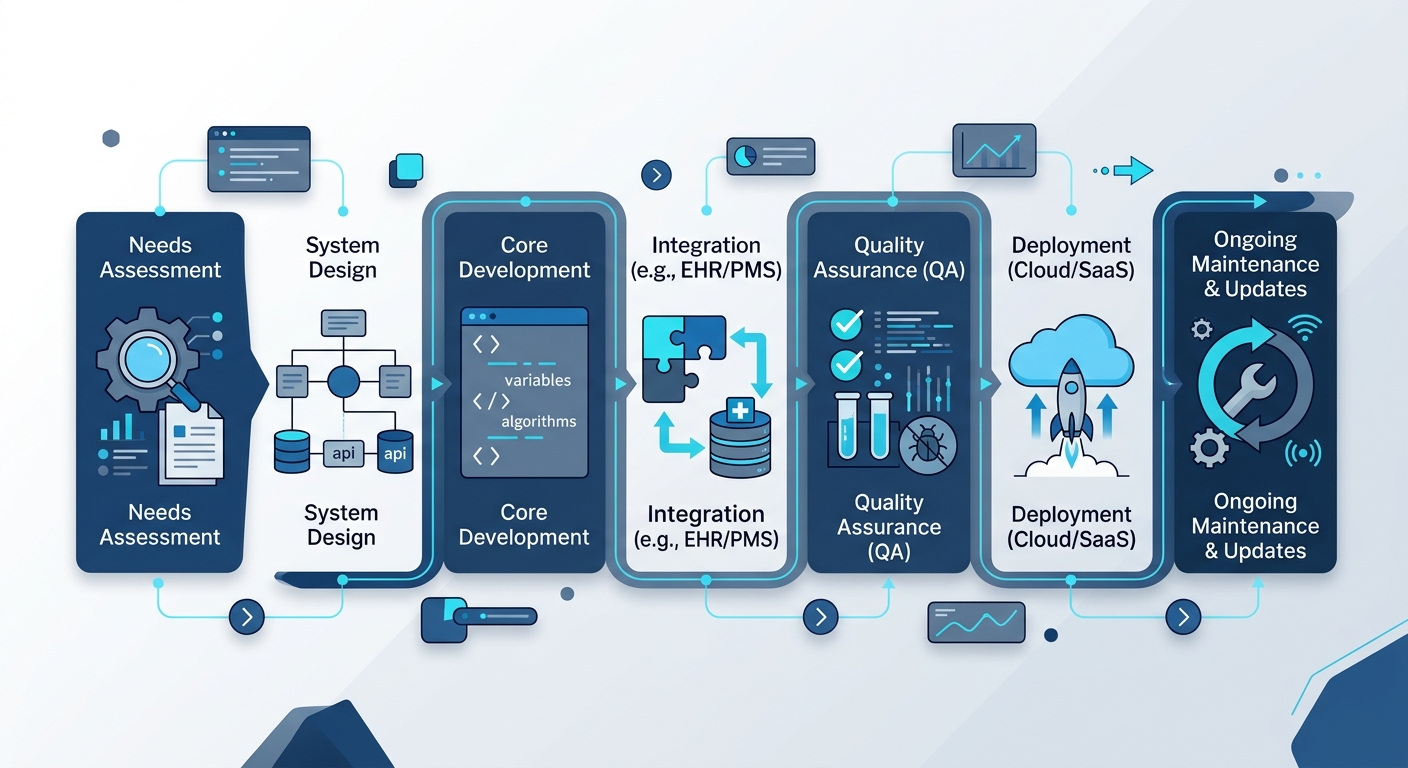
Illustration for Pharmacy Billing Software: 7 Proven Steps to Build Custom Solutions showing a software, SaaS, or AI automation workflow

For product teams, CTOs, and retail pharmacy founders evaluating custom software development services, taking the custom route delivers full control over inventory logic, margins, hardware integrations, and compliance workflows. This medical shop POS development guide breaks down the engineering roadmap, architectural patterns, and integration steps necessary to deliver a production-ready pharmacy billing platform.

Step 1: Map Core Pharmacy ERP Features and Compliance Workflows

Before writing database schemas or selecting frameworks, product managers must outline the business rules unique to pharmacy operations. Unlike standard consumer goods, pharmaceutical products carry regulatory and clinical lifecycles that dictate software behavior.

  • First-Expiry, First-Out (FEFO) Allocation: The billing engine must automatically suggest or enforce batches nearing expiration rather than simple FIFO (First-In, First-Out) models.
  • Regulatory Drug Classifications: Systems must support strict tracking for Schedule H, H1, and X medications (under Indian regulations) or controlled substances internationally, requiring mandatory doctor registration numbers, patient details, and audit-ready digital registers.
  • Multi-Tier Tax Logic: Automated calculation of localized taxes, including Goods and Services Tax (GST) slabs (0%, 5%, 12%, 18%), HSN code validation, and dynamic tax invoice generation.
  • Strip and Loose Unit Dispensing: The point of sale must process fractional units (e.g., selling 4 tablets from a 10-tablet strip) while maintaining precise inventory deductions without rounding errors.

Aligning these requirements early ensures your architecture integrates seamlessly with broader enterprise resource workflows, similar to modular solutions found across specialized business product suites.

Step 2: Design the Relational Database for Batch and Expiry Tracking

The core bottleneck in pharmacy management software development typically lies in poorly indexed inventory databases. Because medical stores stock identical formulations across multiple batches with different manufacturing dates, expiries, purchase costs, and maximum retail prices (MRP), your schema must decouple the base medicine definition from stock instances.

Normalized Schema Blueprint

A resilient schema separates catalog data from physical batches and billing line items:

  • medicines: Stores immutable product data (name, generic chemical formulation, manufacturer, HSN code, Schedule category, storage conditions).
  • medicine_batches: Stores operational batch metrics (foreign key to medicines.id, batch number, expiry date, manufacturing date, purchase rate, MRP, packaging ratio).
  • inventory_stocks: Tracks physical storage (foreign key to batch_id, warehouse/store location ID, available quantity, damaged/quarantined quantity).
  • bill_items: Maps sales transactions directly to a distinct batch_id rather than a generic product ID, capturing exact tax rates and unit margins at the exact second of sale.

Ensure strict database constraints (such as non-negative stock counts and unique composite keys across medicine_id, batch_number, and store_id) run at the database engine level to eliminate race conditions during high-volume counter sales.

Step 3: Select the Pharmacy ERP Features and Tech Stack

Prescription data and financial transactions demand high consistency, low latency, and rock-solid uptime. Selecting the right stack ensures your custom pharmacy billing software balances real-time counter performance with enterprise analytical capabilities.

Layer Recommended Technology Operational Justification
Frontend (POS UI) React or Flutter Cross-platform deployment across desktop terminals, tablets, and handheld devices with rapid keyboard-driven navigation support.
Backend Engine Node.js (NestJS) or Go High concurrency for processing real-time inventory queries and low-overhead microservices.
Primary Database PostgreSQL ACID compliance, native JSONB support for prescription attachments, and powerful indexing for fast batch searches.
Cache Layer Redis In-memory storage for active cashier sessions, product catalog caching, and fast barcode lookup tables.
Offline Sync SQLite / IndexedDB with WatermelonDB Ensures checkout terminals function without an active internet connection and sync back when connected.

For organizations scaling into distributed networks, leveraging modern architectural principles outlined in SaaS for business automation ensures individual stores maintain local speed while head office retains real-time visibility.

Step 4: Implement Barcode Scanner and GST Module API Integrations

Billing speed directly impacts customer wait times. A robust medical shop POS must ingest input seamlessly from hardware peripherals while maintaining compliance with government tax portals.

Hardware Integration (1D/2D Scanners & Thermal Printers)

Barcode scanners typically operate in Human Interface Device (HID) keyboard emulation mode or via virtual COM ports. In web-based POS interfaces, implement hardware-level listeners using the WebHID API or structured keydown event buffers that capture high-speed string bursts, terminating on carriage returns:

  • Configure scanner parsers to recognize GS1 DataMatrix barcodes containing the Global Trade Item Number (GTIN), batch number, and expiration date in a single scan.
  • Interface with thermal receipt printers using raw ESC/POS protocol commands via direct network sockets (TCP/IP) or WebUSB, eliminating operating system print dialog delays.

Automating GST Invoicing via APIs

In jurisdictions requiring electronic invoicing and GST validation, integrate billing endpoints directly with government-authorized GST Suvidha Providers (GSPs) or national portals:

  1. Payload Construction: Transform bill records into JSON schemas matching national standards (validating 8-digit HSN codes, state codes, CGST/SGST/IGST breakdowns).
  2. IRN & QR Code Generation: Make asynchronous calls to fetch the Invoice Reference Number (IRN) and digitally signed QR code string.
  3. Payload Persistence: Store the generated signature and IRN against the local invoice record and render the verifiable cryptographic QR code on the physical thermal receipt.

Step 5: Build Offline-First Counter Functionality

Network latency or broadband outages should never halt a counter transaction. When determining how to build a custom pharmacy billing software, prioritize an offline-first architecture.

Equip the desktop or web client with an embedded local cache (such as SQLite via Electron or IndexedDB in modern browsers). The terminal executes stock subtractions locally against cached batch tables, generates local sequential invoice tokens, and prints receipts instantly. A background background sync service pushes closed invoices to the central cloud server via WebSockets or HTTPS batch endpoints as connectivity resumes, resolving distributed conflicts using deterministic timestamped version vectors.

Step 6: Deploy Scalable Cloud Infrastructure with Cost Optimization

Hosting infrastructure should scale efficiently across store counts without incurring steep flat-rate server charges. Cloud engineering teams should balance reliability with resource consumption.

  • Containerized Deployments: Package your backend services using Docker, orchestrating instances across managed container environments such as AWS ECS or Google Cloud Run. These serverless container platforms scale down to zero or baseline capacity during nighttime store closures, cutting operational compute costs.
  • Database Sizing & Read Replicas: Deploy managed relational databases (such as Amazon RDS for PostgreSQL). Route heavy analytical workloads (e.g., historical sales audits, dead-stock forecasting, tax summaries) to dedicated read replicas, keeping the primary cluster unblocked for counter billing.
  • Storage Tiering for Digital Prescriptions: Store patient prescription uploads in Amazon S3 or Google Cloud Storage, applying lifecycle policies that transition files from Standard storage to Infrequent Access (IA) or Glacier after 90 days to minimize ongoing object storage overhead. Refer to official AWS documentation to configure optimal lifecycle transition rules.

For custom rollouts requiring multi-region deployment or hybrid setups, partnering with specialized software engineering teams ensures your infrastructure achieves regulatory isolation without unnecessary compute overhead.

Step 7: Conduct Compliance Audits, Performance Tuning, and Rollout

Deploying software inside clinical and retail healthcare settings requires stringent testing beyond standard functional unit tests:

  • Concurrency Testing: Simulate peak-hour loads (e.g., 50 parallel terminals executing 20 item checkouts simultaneously) to measure database lock contention on shared inventory tables.
  • Audit Log Immutability: Verify that modifications to narcotic ledgers, purchase rate adjustments, and invoice cancellations produce immutable, append-only system audit trails that log timestamp, terminal IP, and staff identifier.
  • User Acceptance with Pharmacy Staff: Measure the keyboard-only ergonomics of the checkout screen. A seasoned pharmacy cashier should be able to look up a generic salt, select an available batch, split a strip, apply doctor details, and trigger receipt printing without using a mouse.

Pharmacy Billing Software: Key Differences From Standard POS

To understand why custom engineering is necessary, consider how a dedicated medical POS compares to standard retail billing platforms:

Functional Area Generic Retail POS Custom Pharmacy Billing Software
Inventory Allocation Simple SKU subtraction (FIFO) Strict FEFO driven by verified batch expiration dates
Unit Flexibility Single or static pack units Dynamic strip/box fractional calculations with decimal precision
Regulatory Oversight Standard sales receipts Controlled drug registers, doctor registration tracking, patient IDs
Substitutions Manual item lookup Generic salt/molecule cross-referencing and therapeutic alternates
Tax & Compliance Uniform GST rates Complex HSN-level tax splits, automated e-way bill and IRN generation

Frequently Asked Questions

How does pharmacy billing software handle medicine substitutions?

Custom systems index medicines by their international nonproprietary name (INN) or active chemical composition alongside the brand name. When a customer presents a prescription for an out-of-stock brand, the billing engine queries the database for identical formulations, strengths, and dosage forms available in active stock, enabling the pharmacist to dispense compliant generic equivalents safely.

Can custom pharmacy software run on existing point-of-sale hardware?

Yes. By adopting standards-compliant web technologies or lightweight desktop application runtimes (such as Electron or Flutter Desktop), modern pharmacy software interfaces directly with standard USB/Bluetooth handheld barcode scanners, ESC/POS thermal receipt printers, and cash drawers without proprietary hardware lock-in.

What is the most effective approach for handling expired medicine returns?

An enterprise pharmacy billing platform provides automated near-expiry alert modules (30, 60, and 90-day warning windows). The inventory engine isolates near-expiry batches from the active counter billing pool and creates automated Debit Notes linked to the original supplier’s purchase ledger, streamlining returns and credit reconciliation before products reach their expiration date.
N8n Erp Integration: 7 Proven Steps for Custom Systems

Standard integration platforms often fall short when dealing with homegrown, specialized, or legacy enterprise resource planning (ERP) platforms. Most workflow automation tools rely heavily on pre-built connectors designed exclusively for mainstream SaaS tools. When an enterprise operates on a bespoke database or an in-house REST API, engineering teams must evaluate how to integrate n8n with custom ERP systems without being locked into rigid proprietary connectors.

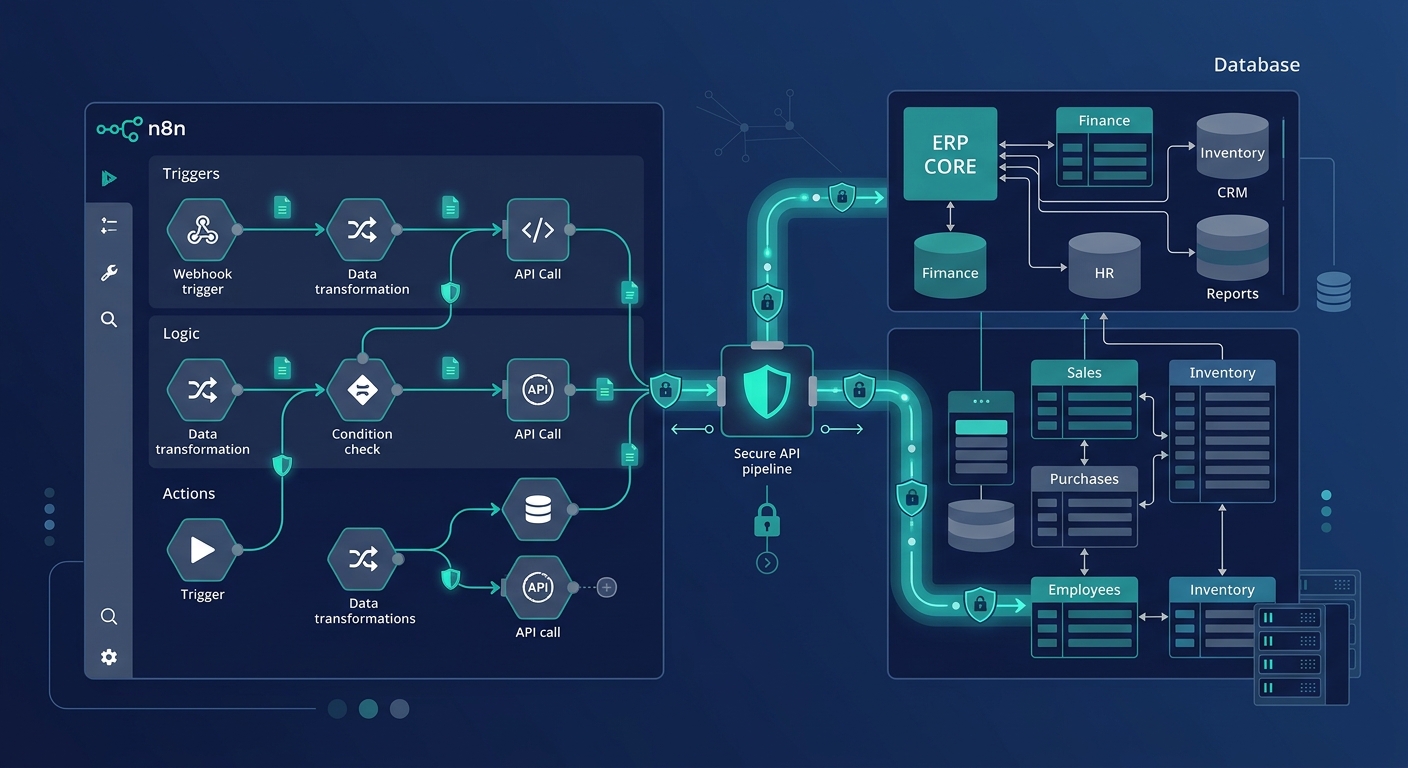
Technical diagram illustration of n8n ERP integration with custom systems and secure database endpoints

Because n8n can be self-hosted within your private infrastructure and provides deep node-level control, it offers an adaptable middle-layer for orchestrating operations between ERPs, external storefronts, warehouse systems, and partner platforms. At Applizor, we engineer custom software and workflow integrations that bridge complex databases with modern APIs. Below is an engineering-focused, 7-step guide to executing a robust n8n ERP integration on custom architectures.

1. Secure the Network Perimeter and Ingress

Before moving data, you must establish how n8n and your custom ERP communicate across network boundaries. Exposing internal database servers or legacy ERP endpoints directly to the public internet introduces unnecessary risk.

  • Virtual Private Cloud (VPC) Peering: Host your self-hosted n8n instance in the same cloud perimeter (or connected via Site-to-Site VPN) as your ERP application database.
  • Reverse Proxy with IP Whitelisting: If your ERP or n8n instance must receive traffic across public networks, place an API gateway or reverse proxy (such as NGINX or Traefik) in front of the endpoints. Restrict access solely to static IPs assigned to your runner nodes.
  • Mutual TLS (mTLS): For high-compliance environments, enforce mTLS so that both the n8n runner and the ERP reverse proxy verify each other’s cryptographic certificates before negotiating any HTTP exchange.

2. Configure Authentication to Connect Custom ERP Without Native Connector

The standard catalog of automation tools assumes your software has an OAuth app listed in a public marketplace. To connect custom ERP without native connector architectures, use n8n’s universal credential engine and the HTTP Request node.

Token-Based and Custom Header Authentication

If your ERP requires dynamic JWTs or rotating session tokens:

  1. Subworkflow Token Generation: Create an independent n8n workflow responsible for calling your ERP’s authentication endpoint (e.g., POST /api/v1/auth/login) using encrypted credentials stored in n8n’s environment variables.
  2. Caching Tokens: Store the active bearer token in a shared Redis cache or an n8n workflow static variable.
  3. Header Injection: Configure your transactional nodes to read the valid token and inject it into the Authorization: Bearer <token> header.

HMAC Signature Verification

When securing communication between microservices, many custom ERPs sign request bodies using a shared secret. You can replicate this logic inside an n8n Code node using the native crypto library to generate an SHA-256 HMAC signature and set the corresponding request header prior to outbound transmission.

3. Establish an n8n Webhook ERP Connection

Data synchronization between your systems can happen through scheduled polling or event-driven triggers. Event-driven setups reduce latency and network overhead when syncing critical business objects like orders or shipments.

To build an n8n webhook ERP connection:

  • Create a Webhook node in n8n and set the HTTP method (typically POST).
  • Copy the production webhook URL into your custom ERP’s outbound event-dispatching service.
  • Configure a verification step inside n8n: Read incoming headers (such as X-ERP-Signature or a shared secret header), validate the payload, and return an immediate 200 OK response code to prevent timeout retries from the ERP while processing continues asynchronously.

For operations teams seeking higher efficiency, pairing event triggers with custom AI automation solutions enables automated invoice parsing and classification before the data reaches your core ledger.

4. Map Complex Schemas Using Code and Set Nodes

Custom ERP databases rarely align neatly with third-party schemas. A common challenge is transforming nested arrays (such as purchase order line items) into tabular database records, or vice versa.

n8n handles structural transformation through two primary approaches:

  • Edit Fields (Set) Node: Ideal for key renaming, static data additions, type casting (e.g., string to float for currency), and simple string interpolations.
  • Code Node (JavaScript/Python): Indispensable for handling deep object mutations, iterating through nested line-item arrays, or running custom mathematical checks (such as tax recalculation).

Consult the official n8n documentation for recommendations on maintaining schema predictability when transforming payloads across JSON arrays.

5. Execute Bidirectional n8n API Request ERP Synchronization

Real-time data parity requires bidirectional orchestration. For example, when an order is placed on an e-commerce platform, inventory must decrement in the custom ERP; conversely, when new purchase orders are received at the warehouse, available stock numbers must sync outward.

A typical n8n API request ERP synchronization pipeline for inventory updates follows this execution order:

Step Workflow Node Operation
1 Schedule / Webhook Trigger Captures inventory adjustments from external warehouse software.
2 Code Node Validates item SKUs and checks for valid positive integer quantities.
3 HTTP Request Node (ERP Read) Verifies current lock status of the item in the custom ERP ledger.
4 IF / Switch Node Evaluates whether stock numbers diverge between systems.
5 HTTP Request Node (ERP Patch) Updates stock levels via PATCH /api/v1/inventory/adjust.

6. Build Idempotency and Fault-Tolerant Retry Logic

In financial and inventory automation, handling failures gracefully is critical. Network timeouts, database deadlocks, or invalid payloads must not result in duplicate ledger entries or missing stock counts.

  • Idempotency Keys: Ensure every mutating API request sent to your custom ERP includes an idempotency token (such as a UUID generated from the external order ID and transaction timestamp). The custom ERP should store this key and return the original response if an identical request is re-sent.
  • Exponential Backoff: Configure the HTTP Request node in n8n to retry failed requests on status codes 429, 502, 503, and 504 using exponential backoff intervals rather than immediate retries.
  • Dead-Letter Workflows: Route permanently rejected payloads (e.g., schema validation errors like 400 Bad Request) to an Error Trigger node. Configure this node to log the failed execution payload directly into an audit queue and alert your on-call engineering team via Slack or email.

7. Implement Audit Trails and Observability

Custom enterprise integrations require end-to-end traceability to satisfy operational auditing requirements. Because ERP workflows directly touch financials, supply chains, and customer records, every execution should leave an audit trail.

When deploying production n8n workflows for custom ERPs:

  • Save execution history with structured logging enabled.
  • Strip sensitive credentials and private keys from the logged execution data to maintain data privacy standards.
  • Monitor execution times and webhook queues using tools like Prometheus and Grafana to detect bottlenecking during peak operational hours.

Why n8n ERP Integration Excels for Custom Stacks

Organizations investing in custom software development require integration architectures that do not impose arbitrary vendor restrictions. Because n8n can be hosted on your own infrastructure, your sensitive operational data never passes through unverified third-party cloud infrastructure.

By treating your workflow configurations as code, managing credentials securely, and designing resilient schema mappings, you can connect any legacy or bespoke ERP with modern digital channels efficiently.

Offline Pos Billing Software: 7 Proven Steps to Build It

Retail checkouts cannot pause when an internet connection drops. Whether caused by local ISP downtime, bad in-store Wi-Fi, or remote store locations, relying strictly on cloud APIs for counter billing creates lines, frustrates shoppers, and directly loses revenue. Designing a resilient offline POS billing software requires transitioning from a cloud-first mindset to an offline-first architecture where the local client acts as an independent billing engine.

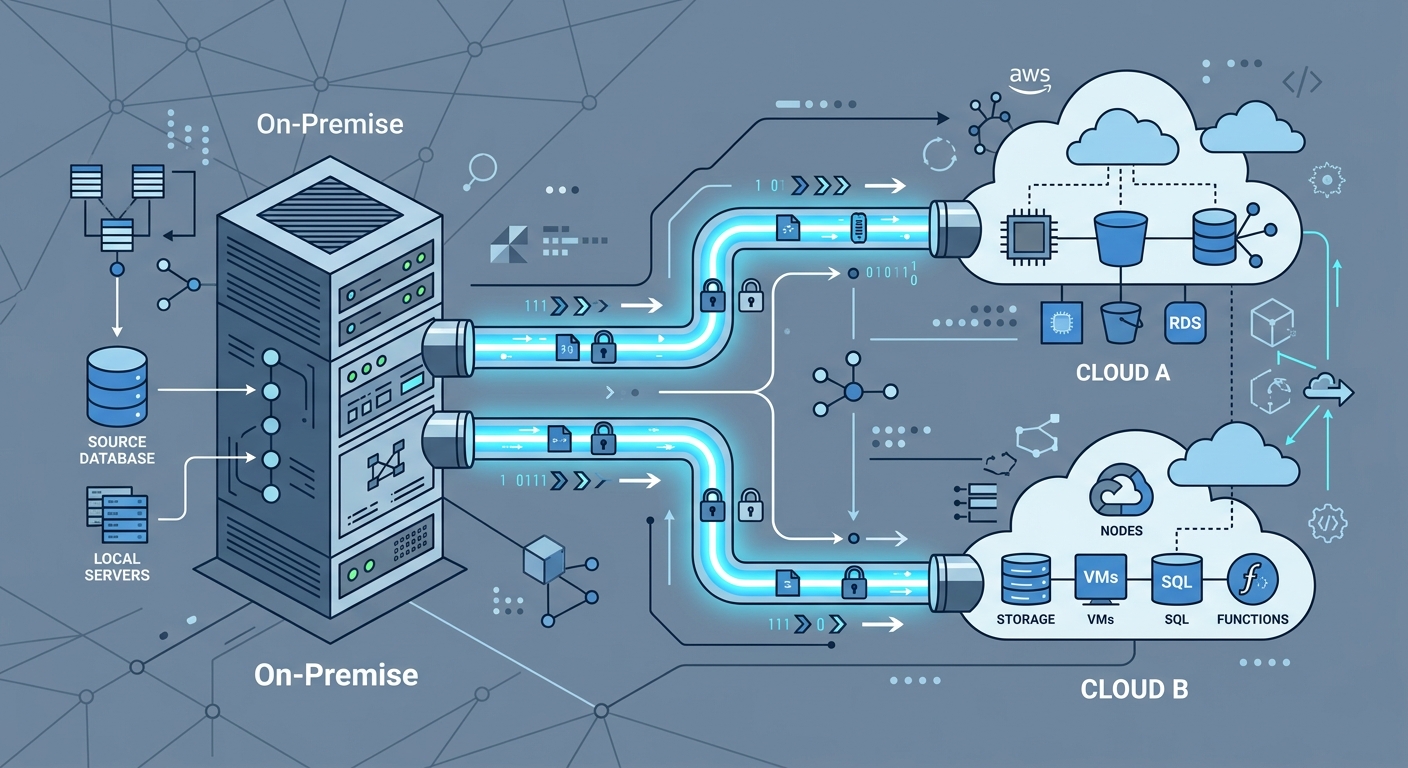
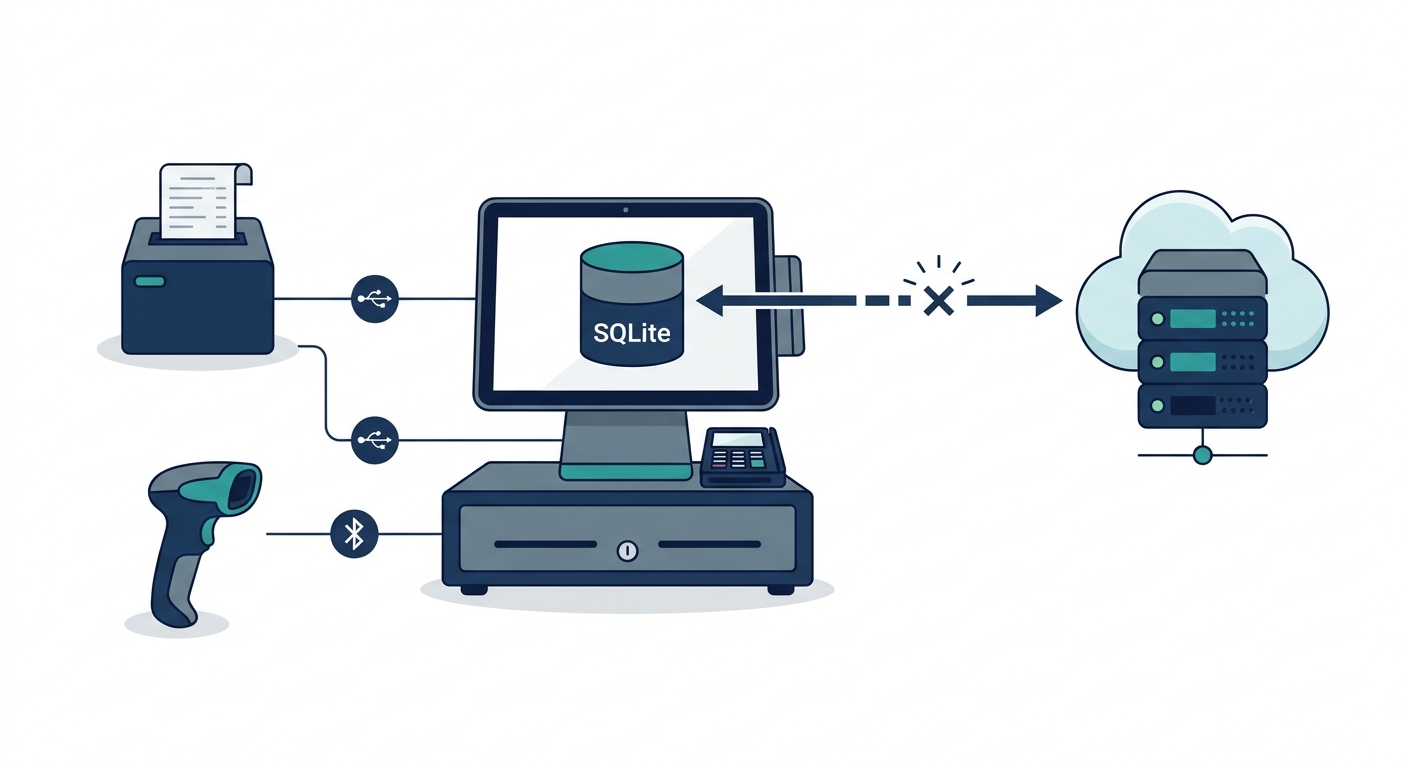
Diagram illustrating offline POS billing software architecture with local database sync and peripheral hardware integration

Building an offline-first system is not simply a matter of caching a few product prices in memory. It demands an intentional data layer, deterministic hardware communication, strict regulatory compliance, and a reliable engine for pos offline data synchronization. Here is the architectural blueprint to build an enterprise-grade retail POS billing solution that operates seamlessly without an active internet connection.

Architecture Overview: Local-First vs. Cloud-Tethered Systems

In traditional cloud-tethered point of sale systems, every transaction triggers a remote HTTP POST request. If the round trip fails, the sale halts. Conversely, a local-first system treats the local device database as the primary source of truth for all transactional writes during checkout. The remote cloud acts as an aggregation, backup, and cross-terminal coordination node.

Feature Cloud-Dependent POS Offline-First Hybrid POS
Primary Write Target Remote cloud database (PostgreSQL, MySQL) Local embedded engine (SQLite, IndexedDB)
Checkout Latency 200ms – 2500ms (network-dependent) 5ms – 20ms (purely local I/O)
Internet Outage Impact Immediate counter shutdown Zero interruption; operations continue normally
Hardware Integration Often routes print jobs through print servers Direct local socket, USB, or serial interfaces
Synchronization Complexity Low (centralized validation) High (distributed conflict resolution required)

Step 1: Select the Local Client Database Engine

The foundation of retail pos software development starts with selecting an embedded database engine capable of handling high write throughput, relational constraints, and transaction safety (ACID compliance) directly on the terminal.

Desktop and Native Mobile (Flutter, React Native, Electron)

For native or desktop runtimes, the industry standard is SQLite, often paired with SQLCipher for transparent database encryption. SQLite offers reliable ACID guarantees, robust query performance over tens of thousands of SKUs, and cross-platform compatibility across Windows, Linux, macOS, and Android POS terminals. For teams building custom desktop or cross-platform solutions, engaging specialized custom software development services ensures the underlying persistence layers are configured for durability and performance.

Browser-Based Progressive Web Apps (PWAs)

If the billing client runs within a browser environment, IndexedDB serves as the primary local storage mechanism. Because the raw IndexedDB API is asynchronous and verbose, engineering teams typically use wrapper libraries such as Dexie.js. IndexedDB stores transactional records as key-value pairs or structured JavaScript objects, allowing rapid writes of cart line items, tax breakdowns, and customer identifiers.

Step 2: Design Local Schemas and the Outbox Sync Queue

When architecting a local database sync for billing apps, separate your data into two distinct operational groups: read-heavy reference data (product catalogs, barcode mappings, pricing tiers, customer loyalty tables) and write-heavy operational data (invoices, audit logs, cash drawer entries).

To guarantee zero transaction loss, implement the Transactional Outbox Pattern on the local device:

  • Master Product Cache: Stores SKU, barcode, unit of measure, tax rate (HSN/SAC codes), and base price. This table is updated via inbound synchronization whenever the network is available.
  • Sales Orders Table: Contains local invoice headers and detailed line items. Every finalized sale is saved here first inside a single local transaction.
  • Sync Queue (Outbox Table): A sequential table containing the payload of every uncommitted local change. Each record includes a local UUID (v4), an entity type (e.g., SALE_INVOICE, STOCK_ADJUSTMENT), the JSON payload, a timestamp, and a status flag (PENDING, SYNCING, FAILED).

By writing the sale record and the outbox record inside the same local database transaction, the application ensures that no sale is ever completed locally without a corresponding entry in the sync queue.

Step 3: Solve Multi-Terminal Invoice Sequencing and GST Compliance

One of the primary roadblocks when learning how to build a retail pos billing software with offline sync is maintaining statutory tax compliance. For instance, under the Goods and Services Tax (GST) framework in India (specifically Section 31 of the CGST Act read with Rule 46), tax invoices must contain a consecutive serial number, not exceeding 16 characters, unique for a financial year.

If three checkout counters in a supermarket go offline simultaneously, a single central sequence generator cannot assign continuous numbers. If Counter 1 and Counter 2 both attempt to assign invoice number INV-1042 locally, syncing them later creates an illegal sequence collision.

The Segmented Prefix Strategy

To adhere to GST regulations while remaining 100% offline-capable, decouple the sequence counter per terminal:

  • Assign each physical terminal a unique alphanumeric identifier registered on the central server (e.g., POS01, POS02).
  • Structure the offline serial pattern to combine the terminal ID, the financial year, and a strictly local monotonic counter. For example: P1/2425/000182.
  • Because Counter 1 issues P1/... and Counter 2 issues P2/..., each terminal guarantees an unbroken, consecutive, non-colliding serial sequence unique to that fiscal year, completely satisfying tax audit requirements without requiring real-time internet verification.

Step 4: Implement Conflict Resolution for Sales and Inventory

When local terminals reconnect to the internet, their queues must sync with the central ERP or cloud database. Synchronization cannot rely on simple “Last Write Wins” (LWW) rules, which frequently cause silent data loss in retail contexts.

1. Financial Data (Immutable Append-Only)

Invoices, receipts, and payments must be treated as append-only records. A cloud server never overwrites a finalized invoice sent from a terminal. The sync server validates the payload’s cryptographic checksum and unique UUID, commits the transaction to the primary relational store, and marks the transaction as confirmed. If an invoice needs adjustment, it must be addressed via a credit note or cancellation event, not an update query.

2. Central Inventory Deductions

Inventory cannot be strictly locked across offline terminals. If two counters sell the last remaining unit of an item while offline, the system must handle the resulting negative inventory gracefully:

  • Event-Driven Reconciliation: The server applies inventory deductions sequentially according to the exact hardware timestamp recorded on the terminal at checkout.
  • Oversell Handling: When an offline transaction pushes stock into negative figures, the central system registers an inventory reconciliation alert for store managers to investigate shrinkage, misplacement, or stock variances, while leaving the customer’s completed sale intact.

Explore our architectural frameworks for retail and supply chain operations on our products page to see how synchronized inventory ledgers are structured across multi-location retail setups.

Step 5: Direct Hardware Integration Without Cloud Dependencies

An offline POS billing software that can calculate taxes locally is useless if it cannot open the cash drawer or print a physical receipt without an internet connection. Web-based or hybrid billing apps must talk directly to local peripherals via low-level protocols.

Direct ESC/POS Thermal Printing

Avoid OS print dialogs, which slow down high-volume retail checkouts. Instead, construct raw ESC/POS byte buffers directly inside your application layer:

  • USB Connectivity: Utilize the WebUSB API in modern browsers or native USB communication libraries (such as LibUSB or Win32 Raw Print APIs) to pipe ESC/POS command arrays directly to the thermal printer endpoint.
  • Serial and Bluetooth: For mobile billing carts or tablet-based setups, implement Web Bluetooth or serial port bindings (RS-232/COM) to transmit character arrays, barcode print sequences, and cutter trigger codes (e.g., GS V 0).
  • LAN/Ethernet Printers: Use raw TCP sockets targeting port 9100. This enables terminals to route thermal receipts across the store’s local network switch even if the upstream internet modem is completely offline.

Step 6: Build the Background Synchronization Engine

The background sync engine is responsible for draining the local outbox queue whenever network connectivity is detected. A robust sync process relies on three architectural pillars:

  1. Network State Listeners: Monitor both browser/OS network events (such as navigator.onLine) and active heartbeat pings against a lightweight health-check endpoint. Relying solely on OS network state can be misleading, as a device may remain connected to a local router that lacks an active internet uplink.
  2. Idempotent API Endpoints: Every sync payload sent to the backend includes an idempotency key (the transaction’s local UUID). If a timeout occurs after the server saves the invoice but before the POS receives the HTTP 200 acknowledgment, the client retries the payload. The server recognizes the idempotency key, skips duplicate insertion, and returns success.
  3. Batching and Exponential Backoff: Rather than blasting the server with hundreds of individual HTTP calls upon reconnection, bundle offline transactions into deterministic batches (e.g., 50 records per payload). If the server responds with a 429 (Too Many Requests) or 503 (Service Unavailable), implement an exponential backoff algorithm with jitter to prevent store reconnects from causing a denial-of-service on your own APIs.

Step 7: Enforce Local Security and Audit Logs

Running a distributed, offline-capable database means sensitive sales data and master configurations reside on physical hardware distributed across various retail stores. Securing this distributed perimeter requires specific safeguards:

  • Storage Encryption: Encrypt local database files using AES-256 (e.g., SQLCipher for SQLite). Protect encryption keys through device-level keychains or DPAPI (Data Protection API) on Windows.
  • Role-Based Permission Caching: Cache cryptographic hashes of cashier and manager PINs locally using bcrypt or Argon2. This allows supervisory overrides (e.g., invoice cancellations, manual discounts, line item deletions) to be verified without calling an authentication server.
  • Immutable Local Audit Trails: Record all system interventions—such as manual cash drawer kicks, failed logins, or discounted line items—in a local append-only journal that syncs to head office alongside financial records.

For engineering leaders seeking end-to-end implementation assistance, our team provides comprehensive architecture design and delivery across software engineering and cloud deployment services.

Key Architectural Considerations for Retail Billing Tools

Building resilient retail POS billing software requires balancing immediate checkout responsiveness with long-term data consistency. Teams should evaluate the following structural questions before writing code:

  • Catalog Size vs. Memory Footprint: Does the local device have sufficient storage and memory to index the entire product catalog, or does the local database need partition strategies based on seasonal or departmental SKUs?
  • Multi-Terminal In-Store Networks: If a location has multiple terminals, can the terminals discover each other over local mDNS/WebSockets to share cash drawer totals or hold/recall carts locally while the broader internet is down?
  • Disaster Recovery and Local Backups: If a local terminal experiences a hardware drive failure while offline, what process exists to safeguard queued, unsynced transactions? (e.g., writing secondary sync logs to redundant SD cards or local NAS drives).

By implementing a solid local-first data architecture, clear conflict-resolution rules, decoupled sequence numbers, and direct hardware communication, engineering teams can build offline POS billing software that guarantees checkout counters stay fast, compliant, and continuously operational.

Legacy Database Migration: 7 Proven Steps to Aws and Gcp

Enterprise data platforms running on bare-metal servers or aging virtual machines frequently present severe operational bottlenecks. Monolithic databases—whether based on commercial engines like Oracle and Microsoft SQL Server or self-managed open-source instances like MySQL and PostgreSQL—suffer from escalating licensing costs, compute ceilings, and brittle failover mechanisms. Moving these mission-critical storage engines to cloud-native platforms on Amazon Web Services (AWS) or Google Cloud Platform (GCP) resolves infrastructure rigidity and enables automated scaling.

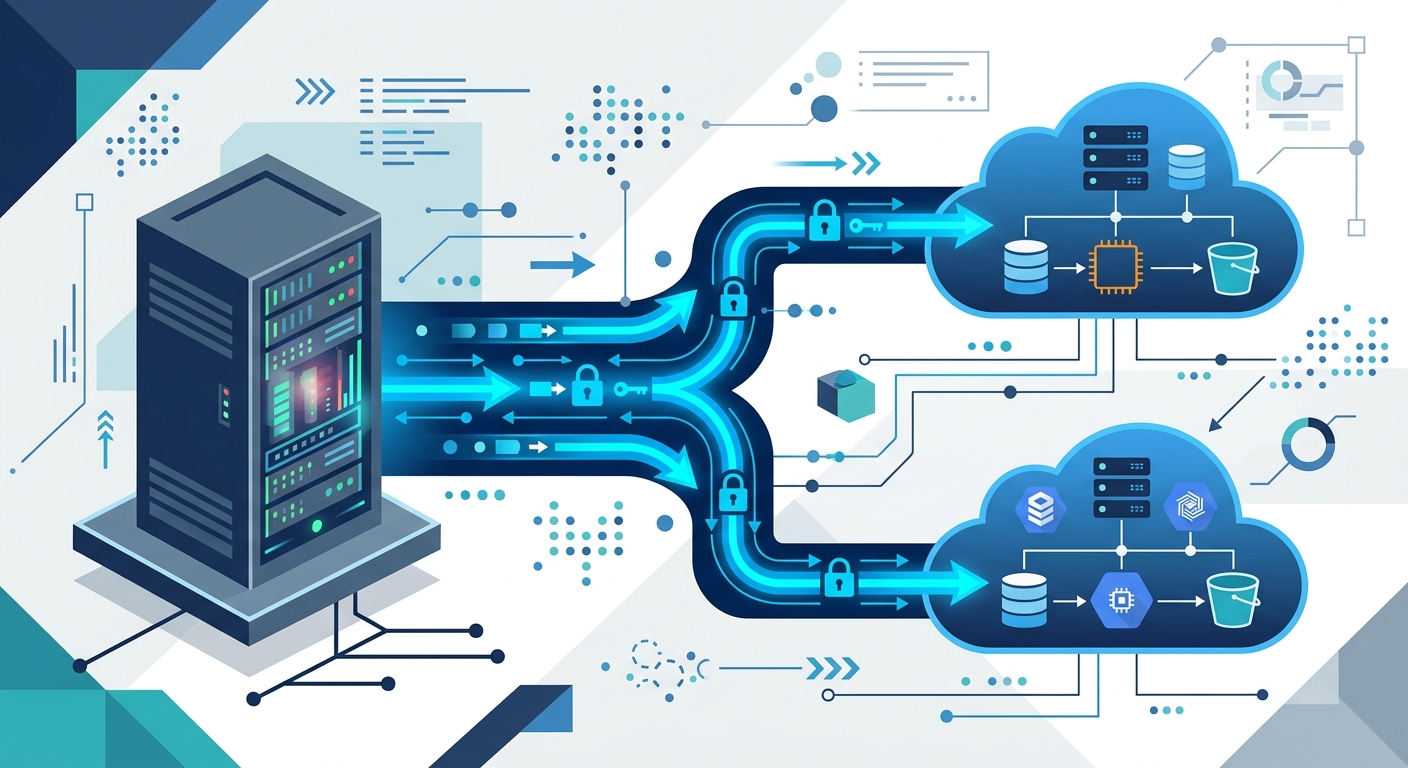
Diagram of a legacy database migration pipeline streaming data securely to cloud infrastructure.

However, migrating a system of record that processes live transactions cannot be treated as a simple export-and-import routine. A successful legacy database migration requires careful schema translation, disciplined network management, rigorous data integrity verification, and a zero-downtime cutover plan. Whether your organization is formulating a legacy database cloud transition plan for AWS Aurora, Google Cloud SQL, or managed NoSQL engines, following a structured architectural blueprint prevents extended maintenance windows and data loss.

AWS vs GCP Database Migration Strategy: Core Platform Differences

Choosing between AWS and GCP for your database modernization depends on your target data architecture, current operational toolchain, and downstream analytics priorities. Both cloud providers offer fully managed relational engines, distributed multi-region databases, and schema conversion utilities, but their underlying architectures emphasize different operational strengths.

Feature / Capability Amazon Web Services (AWS) Google Cloud Platform (GCP)
Flagship Managed Relational Engine Amazon Aurora (MySQL / PostgreSQL compatible) with decoupled storage and compute. Cloud SQL (MySQL, PostgreSQL, SQL Server) and AlloyDB for PostgreSQL.
Globally Distributed Relational Amazon Aurora Global Database (storage-level replication). Google Cloud Spanner (external consistency with TrueTime API).
Native Migration Services AWS Database Migration Service (AWS DMS) and Schema Conversion Tool (SCT). Google Cloud Database Migration Service (DMS) and Datastream.
Schema Refactoring Tools AWS SCT automated rule-based action items and reporting. Integrated Gemini-assisted and open-source migration extensions.
Network Ingress Costs Free ingress over public internet, Direct Connect, or VPN. Free ingress over public internet, Cloud Interconnect, or VPN.

When executing an AWS vs GCP database migration strategy, AWS provides deep tooling maturity for heterogeneous relational conversions (such as converting Oracle PL/SQL to Aurora PostgreSQL). In contrast, GCP offers distinct advantages in horizontal scalability through Cloud Spanner and unified analytical handoffs into BigQuery.

Legacy Database Migration: 7 Technical Steps to AWS and GCP

To safely execute a migration without disrupting active business operations, engineering teams must follow seven disciplined stages from discovery through post-cutover validation.

Step 1: Workload Profiling and Cloud Target Selection

Before moving any records, conduct a comprehensive audit of your source database. This includes mapping transactions per second (TPS), peak I/O operations per second (IOPS), storage growth rates, dependency graphs, and stored procedure complexity. At this stage, determine whether the workload requires a homogeneous migration (retaining the same database engine) or a heterogeneous migration (switching engines, such as moving from proprietary commercial engines to open-source managed equivalents).

If you are re-architecting your underlying services alongside the database layer, coordinating with our custom software development services ensures that your API tiers and domain models align cleanly with cloud-native persistence patterns.

Step 2: Schema Assessment and Heterogeneous Translation

In homogeneous migrations, schema replication is straightforward through native logical export utilities (such as pg_dump or mysqldump). Heterogeneous migrations, however, require rewriting proprietary data types, triggers, sequences, and stored procedures into ANSI-compliant syntax or cloud-specific paradigms.

For teams evaluating how to migrate legacy database to aws gcp architectures, use dedicated tooling to isolate manual refactoring tasks:

  • AWS Schema Conversion Tool (SCT): Automatically generates an assessment report highlighting unsupported data types, spatial extensions, and complex triggers while translating standard views and tables. Review technical guidelines on AWS Documentation.
  • GCP Database Migration Service: Manages initial schema conversion and ongoing replication for supported homogeneous pairings, while third-party tools assist in converting complex relational schemas to services like Cloud Spanner. Detailed implementation requirements can be reviewed on Google Cloud Documentation.

Step 3: Transfer Cost Modeling and Network Topology

Data egress and dedicated connectivity represent critical cost variables during migration. While cloud providers do not charge for incoming data transfer (ingress) over standard network interfaces, cost structures vary once private connections and replication agents are configured.

Evaluate these cost factors during the data transfer phase:

  • Dedicated Network Lines: AWS Direct Connect and Google Cloud Interconnect both require port-hour fees alongside variable outbound transfer rates if bi-directional validation is enabled.
  • Replication Compute Instances: AWS DMS requires provisioning replication instances (e.g., dms.c5 or dms.r5 instance classes), billed hourly based on compute allocation. Google Cloud DMS operates primarily on serverless compute for homogeneous tasks, charging based on provisioned destination resources and networking egress.
  • Storage Overhead: Staging backups in intermediate object storage (such as Amazon S3 or Google Cloud Storage) incurs standard storage and retrieval fees before loading into the managed database.

Step 4: Initial Bulk Data Hydration (Baseline Copy)

Transferring multi-terabyte monolithic databases over standard networks can saturate bandwidth and take days to complete. Split data transfer into an initial bulk hydration phase followed by real-time synchronization. For multi-terabyte datasets where available bandwidth is restricted, physical appliance transfers (such as AWS Snowball or Google Cloud Transfer Appliance) allow secure offline physical transport. For environments with robust direct connections, extract point-in-time consistent snapshots and stream them directly to target storage.

Step 5: Continuous Change Data Capture (CDC) Synchronization

Because your legacy database continues processing reads and writes during the transfer, you must establish an ongoing synchronization pipeline. Change Data Capture (CDC) streams transactions from source database binary/transaction logs (e.g., Oracle Redo Logs, SQL Server Transaction Logs, or MySQL Binlogs) to the target database.

This configuration keeps the target cloud database within milliseconds of the source production system. Engineers using modern cloud ecosystems can leverage the stack outlined in our cloud and DevOps infrastructure stack to monitor CDC latency, memory consumption, and replication delays continuously.

Step 6: Zero-Downtime Cutover Execution

The cutover represents the highest-risk phase of any database transition. A zero-downtime cutover requires deliberate operational sequencing rather than a sudden network switch:

  1. Lower DNS TTL: Reduce the Time to Live (TTL) on database endpoints and dependent microservice domains to 60 seconds at least 48 hours before cutover.
  2. Drain Connection Pools: Temporarily set the application tier into a brief transaction-quiesced or read-only mode to flush all pending in-flight transactions.
  3. Verify CDC Zero-Lag: Confirm that replication lag between the source and the cloud target has reached zero records.
  4. Establish Reverse CDC: Reconfigure the replication pipeline to capture changes on the cloud target and stream them back to the legacy database. This ensures that any data written to the new system is mirrored to the legacy system if an emergency abort occurs.
  5. Promote Cloud Instance and Re-route Traffic: Point application connection strings to the new cloud endpoint and reopen full write traffic.

Step 7: Post-Cutover Validation and Risk Mitigation Rollback

Once live traffic routes to the cloud target, operational teams must monitor performance, transaction commit times, and replication queues. Even thoroughly tested migrations can uncover unexpected edge cases, making a formalized rollback checklist critical.

Risk Mitigation Checklist for Hybrid-Cloud Rollback

Never initiate a cutover without an automated, documented rollback mechanism. If an unrecoverable failure occurs within the target database engine, execute this containment checklist:

  • Operational Reverse Replication: Verify that reverse CDC (Target to Legacy Source) is active and processing writes before the cutover maintenance window closes.
  • Automated Data Parity Verification: Run background checksum comparisons (such as cryptographic table hash samples) to detect data divergence or primary key collision immediately.
  • Centralized Configuration Flags: Maintain dynamic service discovery or environment variable flags in your orchestration layer to redirect database connection strings back to legacy endpoints without redeploying code.
  • Split-Brain Prevention: In the event of an abort, immediately terminate all write access to the cloud database before reactivating legacy write permissions, ensuring transactions are never simultaneously accepted in both systems.

Frequently Asked Questions

What causes CDC synchronization lag during database migration?

Replication lag typically occurs when the legacy source generates transaction logs faster than the replication compute instance can read, parse, and apply them to the target. Primary causes include network bandwidth constraints, unindexed foreign keys on target tables, write throttling on destination cloud storage, or heavy batch-processing jobs running on the source database during replication.

How should non-relational or document data models be migrated to cloud databases?

When migrating non-relational databases (such as self-hosted MongoDB or Couchbase) to managed cloud services (such as AWS DynamoDB or GCP Cloud Bigtable/Firestore), schemas must be redesigned around access patterns rather than normalized entities. This requires defining composite partition keys, sorting strategies, and secondary indexes to handle queries without incurring full table scans.

When is a cutover considered successful enough to decommission the legacy database?

A legacy database should remain in standby with active reverse synchronization for at least one full business cycle (typically 7 to 30 days, depending on monthly financial reporting or regulatory workloads). Decommissioning should only begin once all scheduled batch jobs, analytical pipelines, and downstream audit tools run reliably against the cloud target without discrepancy.

Legacy Database Migration: 7 Proven Steps to Aws and Gcp

Enterprise data platforms running on bare-metal servers or aging virtual machines frequently present severe operational bottlenecks. Monolithic databases—whether based on commercial engines like Oracle and Microsoft SQL Server or self-managed open-source instances like MySQL and PostgreSQL—suffer from escalating licensing costs, compute ceilings, and brittle failover mechanisms. Moving these mission-critical storage engines to cloud-native platforms on Amazon Web Services (AWS) or Google Cloud Platform (GCP) resolves infrastructure rigidity and enables automated scaling.

Diagram of a legacy database migration pipeline streaming data securely to cloud infrastructure.

However, migrating a system of record that processes live transactions cannot be treated as a simple export-and-import routine. A successful legacy database migration requires careful schema translation, disciplined network management, rigorous data integrity verification, and a zero-downtime cutover plan. Whether your organization is formulating a legacy database cloud transition plan for AWS Aurora, Google Cloud SQL, or managed NoSQL engines, following a structured architectural blueprint prevents extended maintenance windows and data loss.

AWS vs GCP Database Migration Strategy: Core Platform Differences

Choosing between AWS and GCP for your database modernization depends on your target data architecture, current operational toolchain, and downstream analytics priorities. Both cloud providers offer fully managed relational engines, distributed multi-region databases, and schema conversion utilities, but their underlying architectures emphasize different operational strengths.

Feature / Capability Amazon Web Services (AWS) Google Cloud Platform (GCP)
Flagship Managed Relational Engine Amazon Aurora (MySQL / PostgreSQL compatible) with decoupled storage and compute. Cloud SQL (MySQL, PostgreSQL, SQL Server) and AlloyDB for PostgreSQL.
Globally Distributed Relational Amazon Aurora Global Database (storage-level replication). Google Cloud Spanner (external consistency with TrueTime API).
Native Migration Services AWS Database Migration Service (AWS DMS) and Schema Conversion Tool (SCT). Google Cloud Database Migration Service (DMS) and Datastream.
Schema Refactoring Tools AWS SCT automated rule-based action items and reporting. Integrated Gemini-assisted and open-source migration extensions.
Network Ingress Costs Free ingress over public internet, Direct Connect, or VPN. Free ingress over public internet, Cloud Interconnect, or VPN.

When executing an AWS vs GCP database migration strategy, AWS provides deep tooling maturity for heterogeneous relational conversions (such as converting Oracle PL/SQL to Aurora PostgreSQL). In contrast, GCP offers distinct advantages in horizontal scalability through Cloud Spanner and unified analytical handoffs into BigQuery.

Legacy Database Migration: 7 Technical Steps to AWS and GCP

To safely execute a migration without disrupting active business operations, engineering teams must follow seven disciplined stages from discovery through post-cutover validation.

Step 1: Workload Profiling and Cloud Target Selection

Before moving any records, conduct a comprehensive audit of your source database. This includes mapping transactions per second (TPS), peak I/O operations per second (IOPS), storage growth rates, dependency graphs, and stored procedure complexity. At this stage, determine whether the workload requires a homogeneous migration (retaining the same database engine) or a heterogeneous migration (switching engines, such as moving from proprietary commercial engines to open-source managed equivalents).

If you are re-architecting your underlying services alongside the database layer, coordinating with our custom software development services ensures that your API tiers and domain models align cleanly with cloud-native persistence patterns.

Step 2: Schema Assessment and Heterogeneous Translation

In homogeneous migrations, schema replication is straightforward through native logical export utilities (such as pg_dump or mysqldump). Heterogeneous migrations, however, require rewriting proprietary data types, triggers, sequences, and stored procedures into ANSI-compliant syntax or cloud-specific paradigms.

For teams evaluating how to migrate legacy database to aws gcp architectures, use dedicated tooling to isolate manual refactoring tasks:

  • AWS Schema Conversion Tool (SCT): Automatically generates an assessment report highlighting unsupported data types, spatial extensions, and complex triggers while translating standard views and tables. Review technical guidelines on AWS Documentation.
  • GCP Database Migration Service: Manages initial schema conversion and ongoing replication for supported homogeneous pairings, while third-party tools assist in converting complex relational schemas to services like Cloud Spanner. Detailed implementation requirements can be reviewed on Google Cloud Documentation.

Step 3: Transfer Cost Modeling and Network Topology

Data egress and dedicated connectivity represent critical cost variables during migration. While cloud providers do not charge for incoming data transfer (ingress) over standard network interfaces, cost structures vary once private connections and replication agents are configured.

Evaluate these cost factors during the data transfer phase:

  • Dedicated Network Lines: AWS Direct Connect and Google Cloud Interconnect both require port-hour fees alongside variable outbound transfer rates if bi-directional validation is enabled.
  • Replication Compute Instances: AWS DMS requires provisioning replication instances (e.g., dms.c5 or dms.r5 instance classes), billed hourly based on compute allocation. Google Cloud DMS operates primarily on serverless compute for homogeneous tasks, charging based on provisioned destination resources and networking egress.
  • Storage Overhead: Staging backups in intermediate object storage (such as Amazon S3 or Google Cloud Storage) incurs standard storage and retrieval fees before loading into the managed database.

Step 4: Initial Bulk Data Hydration (Baseline Copy)

Transferring multi-terabyte monolithic databases over standard networks can saturate bandwidth and take days to complete. Split data transfer into an initial bulk hydration phase followed by real-time synchronization. For multi-terabyte datasets where available bandwidth is restricted, physical appliance transfers (such as AWS Snowball or Google Cloud Transfer Appliance) allow secure offline physical transport. For environments with robust direct connections, extract point-in-time consistent snapshots and stream them directly to target storage.

Step 5: Continuous Change Data Capture (CDC) Synchronization

Because your legacy database continues processing reads and writes during the transfer, you must establish an ongoing synchronization pipeline. Change Data Capture (CDC) streams transactions from source database binary/transaction logs (e.g., Oracle Redo Logs, SQL Server Transaction Logs, or MySQL Binlogs) to the target database.

This configuration keeps the target cloud database within milliseconds of the source production system. Engineers using modern cloud ecosystems can leverage the stack outlined in our cloud and DevOps infrastructure stack to monitor CDC latency, memory consumption, and replication delays continuously.

Step 6: Zero-Downtime Cutover Execution

The cutover represents the highest-risk phase of any database transition. A zero-downtime cutover requires deliberate operational sequencing rather than a sudden network switch:

  1. Lower DNS TTL: Reduce the Time to Live (TTL) on database endpoints and dependent microservice domains to 60 seconds at least 48 hours before cutover.
  2. Drain Connection Pools: Temporarily set the application tier into a brief transaction-quiesced or read-only mode to flush all pending in-flight transactions.
  3. Verify CDC Zero-Lag: Confirm that replication lag between the source and the cloud target has reached zero records.
  4. Establish Reverse CDC: Reconfigure the replication pipeline to capture changes on the cloud target and stream them back to the legacy database. This ensures that any data written to the new system is mirrored to the legacy system if an emergency abort occurs.
  5. Promote Cloud Instance and Re-route Traffic: Point application connection strings to the new cloud endpoint and reopen full write traffic.

Step 7: Post-Cutover Validation and Risk Mitigation Rollback

Once live traffic routes to the cloud target, operational teams must monitor performance, transaction commit times, and replication queues. Even thoroughly tested migrations can uncover unexpected edge cases, making a formalized rollback checklist critical.

Risk Mitigation Checklist for Hybrid-Cloud Rollback

Never initiate a cutover without an automated, documented rollback mechanism. If an unrecoverable failure occurs within the target database engine, execute this containment checklist:

  • Operational Reverse Replication: Verify that reverse CDC (Target to Legacy Source) is active and processing writes before the cutover maintenance window closes.
  • Automated Data Parity Verification: Run background checksum comparisons (such as cryptographic table hash samples) to detect data divergence or primary key collision immediately.
  • Centralized Configuration Flags: Maintain dynamic service discovery or environment variable flags in your orchestration layer to redirect database connection strings back to legacy endpoints without redeploying code.
  • Split-Brain Prevention: In the event of an abort, immediately terminate all write access to the cloud database before reactivating legacy write permissions, ensuring transactions are never simultaneously accepted in both systems.

Frequently Asked Questions

What causes CDC synchronization lag during database migration?

Replication lag typically occurs when the legacy source generates transaction logs faster than the replication compute instance can read, parse, and apply them to the target. Primary causes include network bandwidth constraints, unindexed foreign keys on target tables, write throttling on destination cloud storage, or heavy batch-processing jobs running on the source database during replication.

How should non-relational or document data models be migrated to cloud databases?

When migrating non-relational databases (such as self-hosted MongoDB or Couchbase) to managed cloud services (such as AWS DynamoDB or GCP Cloud Bigtable/Firestore), schemas must be redesigned around access patterns rather than normalized entities. This requires defining composite partition keys, sorting strategies, and secondary indexes to handle queries without incurring full table scans.

When is a cutover considered successful enough to decommission the legacy database?

A legacy database should remain in standby with active reverse synchronization for at least one full business cycle (typically 7 to 30 days, depending on monthly financial reporting or regulatory workloads). Decommissioning should only begin once all scheduled batch jobs, analytical pipelines, and downstream audit tools run reliably against the cloud target without discrepancy.

Api Security Best Practices: 7 Proven Strategies for Saas Development

The Critical Role of API Security in SaaS Environments

In today’s interconnected digital landscape, Software as a Service (SaaS) applications are the backbone of countless businesses, from startups to large enterprises. At the heart of every SaaS offering lies its Application Programming Interfaces (APIs) – the programmatic connections that allow different software systems to communicate, share data, and orchestrate complex workflows. While APIs drive innovation and efficiency, they also represent a significant and often overlooked attack surface. For SaaS providers, neglecting API security can lead to devastating data breaches, reputational damage, and severe financial and legal repercussions.

Digital shield protecting interconnected SaaS API endpoints with AI-powered security, illustrating API security best practices.

The unique challenges of SaaS, particularly multi-tenant architectures, amplify the need for robust API security. In a multi-tenant environment, a single instance of software serves multiple customers, meaning a vulnerability in one API endpoint could potentially expose data across all tenants. Traditional security measures, often focused on human interactions, frequently fall short when addressing non-human identities like service accounts and API tokens that operate continuously with elevated privileges. Understanding the benefits of SaaS means also understanding its inherent security responsibilities.

To effectively secure SaaS APIs and protect sensitive customer data, a comprehensive, lifecycle-oriented approach is essential. This involves integrating security from the initial design phase through development, deployment, and continuous monitoring. Here are 7 proven strategies that form the bedrock of robust API security for any SaaS development.

7 Proven Strategies for Robust API Security in SaaS Development

1. Design-First Security and Threat Modeling

API security begins long before the first line of code is written. Adopting a design-first security approach means integrating security considerations into the initial API design and architecture phases. This involves:

  • Threat Modeling: Systematically identifying potential threats and vulnerabilities in the API design (e.g., using frameworks like STRIDE or DREAD). This helps anticipate what are API security threats specific to your application’s logic and data flows.
  • Principle of Least Privilege: Designing APIs to grant only the minimum necessary permissions for any given operation or user role.
  • API Contract Enforcement: Defining clear API specifications (e.g., OpenAPI/Swagger) that dictate expected inputs, outputs, and behaviors, and then enforcing these contracts at runtime to prevent malformed requests.

2. Robust Authentication and Authorization Mechanisms

Controlling who can access your APIs and what actions they can perform is fundamental. Effective custom software development for SaaS demands sophisticated methods for saas api authentication methods:

  • OAuth 2.0 and OpenID Connect: For user-based authentication, these standards provide secure delegation of access and identity verification, crucial for integrating third-party applications securely. For machine-to-machine communication, client credentials grant types can be used.
  • API Keys (with caution): While simple, API keys should be treated as sensitive credentials. They are best used for identifying client applications rather than individual users, often paired with IP whitelisting or rate limiting. They should be regularly rotated and never embedded directly in client-side code.
  • Multi-Factor Authentication (MFA): Where applicable, MFA adds an extra layer of security for administrative API access or sensitive operations.
  • Role-Based Access Control (RBAC) & Attribute-Based Access Control (ABAC): Implement granular authorization policies. RBAC assigns permissions based on predefined roles (e.g., ‘admin’, ‘user’, ‘guest’), while ABAC offers more dynamic control based on user attributes, resource attributes, and environmental conditions, which is particularly powerful for api security for multi-tenant saas environments.
  • Token Management: Utilize short-lived access tokens and refresh tokens to minimize the window of exposure if a token is compromised.

3. Data Encryption and Secure Communication

Protecting data both in transit and at rest is non-negotiable for SaaS providers:

  • TLS/SSL Everywhere: Enforce Transport Layer Security (TLS) for all API communications to encrypt data in transit, preventing eavesdropping and tampering. Always use the latest, strong TLS versions.
  • Encryption at Rest: Encrypt sensitive data stored in databases, file systems, and backups. This ensures that even if a data store is compromised, the data remains unreadable without the decryption key.
  • Secure Key Management: Implement robust processes for generating, storing, rotating, and revoking encryption keys. Hardware Security Modules (HSMs) or cloud key management services (e.g., AWS KMS, GCP KMS) are recommended.

4. API Gateways and Web Application Firewalls (WAFs)

These tools act as crucial enforcement points at the edge of your API infrastructure:

  • API Gateways: Serve as a single entry point for all API requests, enabling centralized policy enforcement. They can handle authentication, authorization, rate limiting, traffic routing, caching, and transformation. This provides a critical layer for how to secure saas apis by abstracting backend services and providing a consistent security posture.
  • Web Application Firewalls (WAFs): Protect APIs from common web exploits (e.g., SQL injection, cross-site scripting, DDoS attacks) by inspecting incoming traffic and blocking malicious requests. WAFs can be deployed in front of API gateways or directly in front of API endpoints.

5. Continuous Monitoring, Logging, and Incident Response

Proactive detection and rapid response are vital for minimizing the impact of security incidents:

  • Real-time Monitoring: Implement comprehensive logging and monitoring of all API activity. Track request rates, error rates, data access patterns, and user behavior.
  • Centralized Logging: Aggregate logs from all API components into a Security Information and Event Management (SIEM) system for centralized analysis and threat detection.
  • Anomaly Detection: Establish baselines for normal API behavior and use tools to automatically flag deviations that could indicate a security breach or attack.
  • Incident Response Plan: Develop and regularly test a clear incident response plan that outlines steps for detection, containment, eradication, recovery, and post-incident analysis.
  • Regular Audits and Penetration Testing: Conduct periodic security audits and penetration tests to identify vulnerabilities before attackers do.

6. Leveraging AI for Advanced Threat Detection and Automation

This is where cutting-edge technology significantly enhances API security. Applizor’s expertise in AI automation software development can be leveraged to transform your API security posture:

  • AI-Powered Anomaly Detection: Go beyond simple rule-based alerts. AI and machine learning algorithms can analyze vast amounts of API traffic data to identify subtle, complex patterns indicative of sophisticated attacks, insider threats, or compromised accounts that human analysts might miss. This includes unusual login locations, data exfiltration attempts, or deviations from typical API call sequences.
  • Automated Policy Enforcement: Integrate AI insights with workflow automation tools (like n8n, a technology Applizor specializes in) to enable automated responses. For example, if AI detects a suspicious login attempt or an unusual burst of data access, it can automatically block the IP, revoke a compromised token, or trigger an alert to the security team, significantly reducing response times.
  • Behavioral Analytics: AI can build profiles of normal user and application behavior, making it easier to spot deviations that signal a potential compromise. This is particularly useful for identifying abuse of legitimate API credentials.
  • Predictive Security: Over time, AI can learn from past incidents and emerging threat landscapes to predict potential vulnerabilities and recommend proactive security measures.

7. Compliance and Regulatory Adherence

For SaaS providers, robust API security is not just good practice; it’s a legal and ethical imperative that directly impacts compliance with various industry regulations:

  • GDPR (General Data Protection Regulation): API security ensures personal data is processed securely, respecting data privacy, consent, and data residency requirements. Secure APIs prevent unauthorized access to customer data, a key GDPR mandate.
  • HIPAA (Health Insurance Portability and Accountability Act): For healthcare SaaS, APIs must protect Electronic Protected Health Information (ePHI) through strict access controls, encryption, and audit trails.
  • PCI DSS (Payment Card Industry Data Security Standard): If your SaaS handles payment card data, API security is critical for protecting cardholder data environments, including secure transmission and storage of sensitive payment information.
  • Regular Compliance Audits: Implement processes to regularly audit your API security practices against relevant regulatory frameworks, ensuring continuous adherence and readiness for official assessments.

Integrating Security Across the SaaS Development Lifecycle

The strategies outlined above are most effective when integrated throughout the entire SaaS development lifecycle, not as an afterthought. From initial design and architecture to continuous integration/continuous deployment (CI/CD) pipelines and ongoing operations, security must be a shared responsibility. This ‘shift-left’ approach ensures that vulnerabilities are identified and remediated early, reducing costs and risks. Applizor leverages a wide range of technologies and methodologies to embed security at every stage of development, delivering resilient and trustworthy SaaS solutions.

Conclusion

In the competitive SaaS landscape, API security is no longer just a technical concern; it’s a fundamental business differentiator and a cornerstone of customer trust. By implementing these API security best practices – from design-first principles and robust authentication to leveraging AI for advanced threat detection and ensuring regulatory compliance – SaaS providers can build resilient applications that protect sensitive data and foster long-term success. Prioritizing API security is an investment in your company’s future, safeguarding your reputation and ensuring the integrity of your digital ecosystem.