
Standard integration platforms often fall short when dealing with homegrown, specialized, or legacy enterprise resource planning (ERP) platforms. Most workflow automation tools rely heavily on pre-built connectors designed exclusively for mainstream SaaS tools. When an enterprise operates on a bespoke database or an in-house REST API, engineering teams must evaluate how to integrate n8n with custom ERP systems without being locked into rigid proprietary connectors.
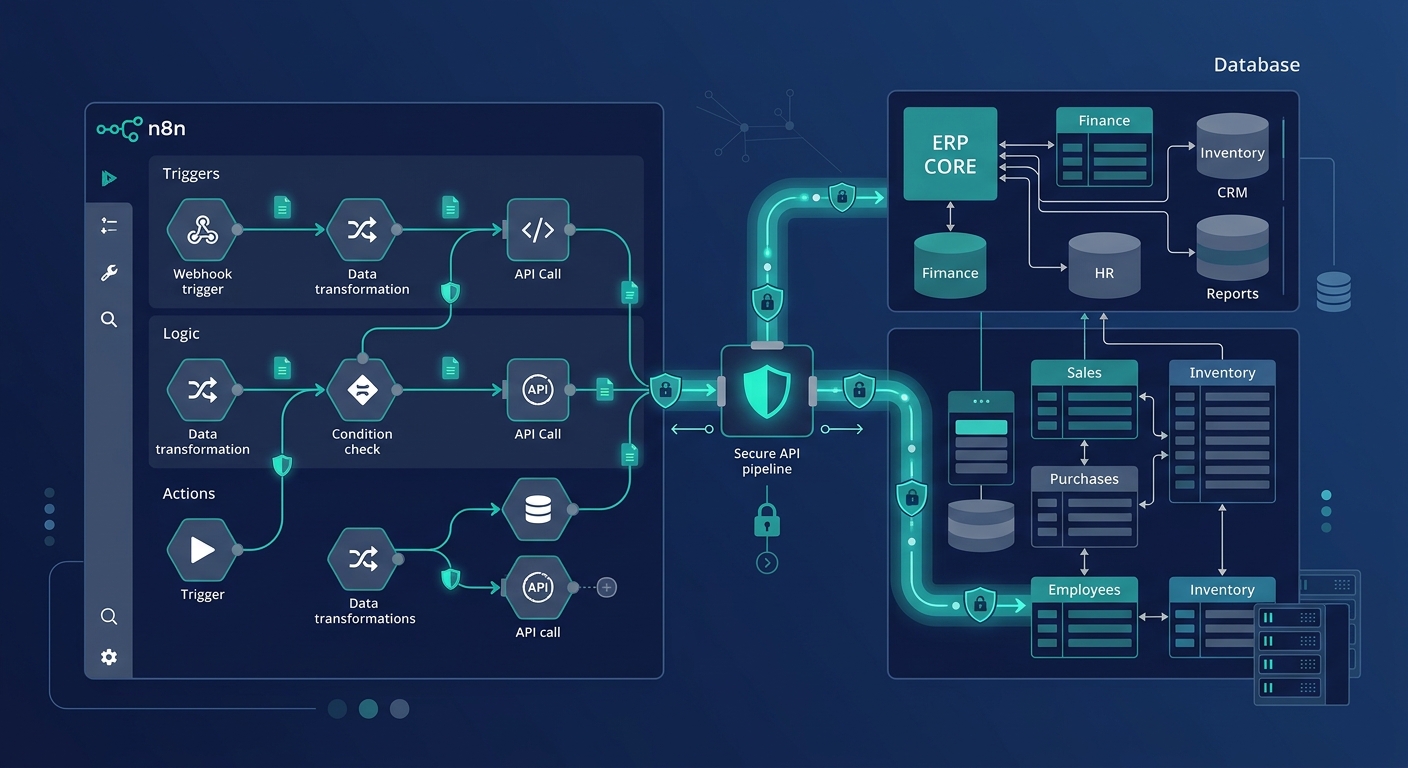
Because n8n can be self-hosted within your private infrastructure and provides deep node-level control, it offers an adaptable middle-layer for orchestrating operations between ERPs, external storefronts, warehouse systems, and partner platforms. At Applizor, we engineer custom software and workflow integrations that bridge complex databases with modern APIs. Below is an engineering-focused, 7-step guide to executing a robust n8n ERP integration on custom architectures.
1. Secure the Network Perimeter and Ingress
Before moving data, you must establish how n8n and your custom ERP communicate across network boundaries. Exposing internal database servers or legacy ERP endpoints directly to the public internet introduces unnecessary risk.
- Virtual Private Cloud (VPC) Peering: Host your self-hosted n8n instance in the same cloud perimeter (or connected via Site-to-Site VPN) as your ERP application database.
- Reverse Proxy with IP Whitelisting: If your ERP or n8n instance must receive traffic across public networks, place an API gateway or reverse proxy (such as NGINX or Traefik) in front of the endpoints. Restrict access solely to static IPs assigned to your runner nodes.
- Mutual TLS (mTLS): For high-compliance environments, enforce mTLS so that both the n8n runner and the ERP reverse proxy verify each other’s cryptographic certificates before negotiating any HTTP exchange.
2. Configure Authentication to Connect Custom ERP Without Native Connector
The standard catalog of automation tools assumes your software has an OAuth app listed in a public marketplace. To connect custom ERP without native connector architectures, use n8n’s universal credential engine and the HTTP Request node.
Token-Based and Custom Header Authentication
If your ERP requires dynamic JWTs or rotating session tokens:
- Subworkflow Token Generation: Create an independent n8n workflow responsible for calling your ERP’s authentication endpoint (e.g.,
POST /api/v1/auth/login) using encrypted credentials stored in n8n’s environment variables. - Caching Tokens: Store the active bearer token in a shared Redis cache or an n8n workflow static variable.
- Header Injection: Configure your transactional nodes to read the valid token and inject it into the
Authorization: Bearer <token>header.
HMAC Signature Verification
When securing communication between microservices, many custom ERPs sign request bodies using a shared secret. You can replicate this logic inside an n8n Code node using the native crypto library to generate an SHA-256 HMAC signature and set the corresponding request header prior to outbound transmission.
3. Establish an n8n Webhook ERP Connection
Data synchronization between your systems can happen through scheduled polling or event-driven triggers. Event-driven setups reduce latency and network overhead when syncing critical business objects like orders or shipments.
To build an n8n webhook ERP connection:
- Create a Webhook node in n8n and set the HTTP method (typically
POST). - Copy the production webhook URL into your custom ERP’s outbound event-dispatching service.
- Configure a verification step inside n8n: Read incoming headers (such as
X-ERP-Signatureor a shared secret header), validate the payload, and return an immediate200 OKresponse code to prevent timeout retries from the ERP while processing continues asynchronously.
For operations teams seeking higher efficiency, pairing event triggers with custom AI automation solutions enables automated invoice parsing and classification before the data reaches your core ledger.
4. Map Complex Schemas Using Code and Set Nodes
Custom ERP databases rarely align neatly with third-party schemas. A common challenge is transforming nested arrays (such as purchase order line items) into tabular database records, or vice versa.
n8n handles structural transformation through two primary approaches:
- Edit Fields (Set) Node: Ideal for key renaming, static data additions, type casting (e.g., string to float for currency), and simple string interpolations.
- Code Node (JavaScript/Python): Indispensable for handling deep object mutations, iterating through nested line-item arrays, or running custom mathematical checks (such as tax recalculation).
Consult the official n8n documentation for recommendations on maintaining schema predictability when transforming payloads across JSON arrays.
5. Execute Bidirectional n8n API Request ERP Synchronization
Real-time data parity requires bidirectional orchestration. For example, when an order is placed on an e-commerce platform, inventory must decrement in the custom ERP; conversely, when new purchase orders are received at the warehouse, available stock numbers must sync outward.
A typical n8n API request ERP synchronization pipeline for inventory updates follows this execution order:
| Step | Workflow Node | Operation |
|---|---|---|
| 1 | Schedule / Webhook Trigger | Captures inventory adjustments from external warehouse software. |
| 2 | Code Node | Validates item SKUs and checks for valid positive integer quantities. |
| 3 | HTTP Request Node (ERP Read) | Verifies current lock status of the item in the custom ERP ledger. |
| 4 | IF / Switch Node | Evaluates whether stock numbers diverge between systems. |
| 5 | HTTP Request Node (ERP Patch) | Updates stock levels via PATCH /api/v1/inventory/adjust. |
6. Build Idempotency and Fault-Tolerant Retry Logic
In financial and inventory automation, handling failures gracefully is critical. Network timeouts, database deadlocks, or invalid payloads must not result in duplicate ledger entries or missing stock counts.
- Idempotency Keys: Ensure every mutating API request sent to your custom ERP includes an idempotency token (such as a UUID generated from the external order ID and transaction timestamp). The custom ERP should store this key and return the original response if an identical request is re-sent.
- Exponential Backoff: Configure the HTTP Request node in n8n to retry failed requests on status codes
429,502,503, and504using exponential backoff intervals rather than immediate retries. - Dead-Letter Workflows: Route permanently rejected payloads (e.g., schema validation errors like
400 Bad Request) to an Error Trigger node. Configure this node to log the failed execution payload directly into an audit queue and alert your on-call engineering team via Slack or email.
7. Implement Audit Trails and Observability
Custom enterprise integrations require end-to-end traceability to satisfy operational auditing requirements. Because ERP workflows directly touch financials, supply chains, and customer records, every execution should leave an audit trail.
When deploying production n8n workflows for custom ERPs:
- Save execution history with structured logging enabled.
- Strip sensitive credentials and private keys from the logged execution data to maintain data privacy standards.
- Monitor execution times and webhook queues using tools like Prometheus and Grafana to detect bottlenecking during peak operational hours.
Why n8n ERP Integration Excels for Custom Stacks
Organizations investing in custom software development require integration architectures that do not impose arbitrary vendor restrictions. Because n8n can be hosted on your own infrastructure, your sensitive operational data never passes through unverified third-party cloud infrastructure.
By treating your workflow configurations as code, managing credentials securely, and designing resilient schema mappings, you can connect any legacy or bespoke ERP with modern digital channels efficiently.