
Retail checkouts cannot pause when an internet connection drops. Whether caused by local ISP downtime, bad in-store Wi-Fi, or remote store locations, relying strictly on cloud APIs for counter billing creates lines, frustrates shoppers, and directly loses revenue. Designing a resilient offline POS billing software requires transitioning from a cloud-first mindset to an offline-first architecture where the local client acts as an independent billing engine.
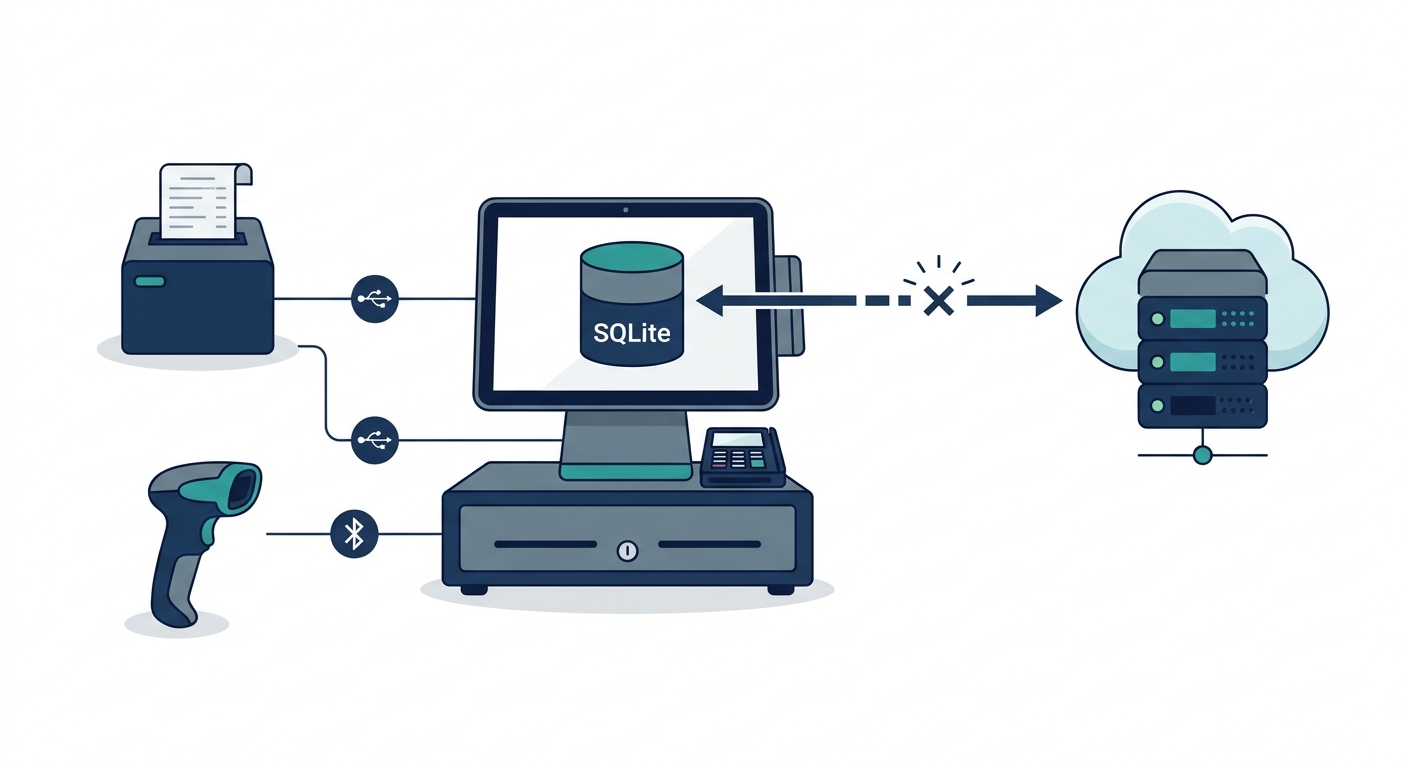
Building an offline-first system is not simply a matter of caching a few product prices in memory. It demands an intentional data layer, deterministic hardware communication, strict regulatory compliance, and a reliable engine for pos offline data synchronization. Here is the architectural blueprint to build an enterprise-grade retail POS billing solution that operates seamlessly without an active internet connection.
Architecture Overview: Local-First vs. Cloud-Tethered Systems
In traditional cloud-tethered point of sale systems, every transaction triggers a remote HTTP POST request. If the round trip fails, the sale halts. Conversely, a local-first system treats the local device database as the primary source of truth for all transactional writes during checkout. The remote cloud acts as an aggregation, backup, and cross-terminal coordination node.
| Feature | Cloud-Dependent POS | Offline-First Hybrid POS |
|---|---|---|
| Primary Write Target | Remote cloud database (PostgreSQL, MySQL) | Local embedded engine (SQLite, IndexedDB) |
| Checkout Latency | 200ms – 2500ms (network-dependent) | 5ms – 20ms (purely local I/O) |
| Internet Outage Impact | Immediate counter shutdown | Zero interruption; operations continue normally |
| Hardware Integration | Often routes print jobs through print servers | Direct local socket, USB, or serial interfaces |
| Synchronization Complexity | Low (centralized validation) | High (distributed conflict resolution required) |
Step 1: Select the Local Client Database Engine
The foundation of retail pos software development starts with selecting an embedded database engine capable of handling high write throughput, relational constraints, and transaction safety (ACID compliance) directly on the terminal.
Desktop and Native Mobile (Flutter, React Native, Electron)
For native or desktop runtimes, the industry standard is SQLite, often paired with SQLCipher for transparent database encryption. SQLite offers reliable ACID guarantees, robust query performance over tens of thousands of SKUs, and cross-platform compatibility across Windows, Linux, macOS, and Android POS terminals. For teams building custom desktop or cross-platform solutions, engaging specialized custom software development services ensures the underlying persistence layers are configured for durability and performance.
Browser-Based Progressive Web Apps (PWAs)
If the billing client runs within a browser environment, IndexedDB serves as the primary local storage mechanism. Because the raw IndexedDB API is asynchronous and verbose, engineering teams typically use wrapper libraries such as Dexie.js. IndexedDB stores transactional records as key-value pairs or structured JavaScript objects, allowing rapid writes of cart line items, tax breakdowns, and customer identifiers.
Step 2: Design Local Schemas and the Outbox Sync Queue
When architecting a local database sync for billing apps, separate your data into two distinct operational groups: read-heavy reference data (product catalogs, barcode mappings, pricing tiers, customer loyalty tables) and write-heavy operational data (invoices, audit logs, cash drawer entries).
To guarantee zero transaction loss, implement the Transactional Outbox Pattern on the local device:
- Master Product Cache: Stores SKU, barcode, unit of measure, tax rate (HSN/SAC codes), and base price. This table is updated via inbound synchronization whenever the network is available.
- Sales Orders Table: Contains local invoice headers and detailed line items. Every finalized sale is saved here first inside a single local transaction.
- Sync Queue (Outbox Table): A sequential table containing the payload of every uncommitted local change. Each record includes a local UUID (v4), an entity type (e.g.,
SALE_INVOICE,STOCK_ADJUSTMENT), the JSON payload, a timestamp, and a status flag (PENDING,SYNCING,FAILED).
By writing the sale record and the outbox record inside the same local database transaction, the application ensures that no sale is ever completed locally without a corresponding entry in the sync queue.
Step 3: Solve Multi-Terminal Invoice Sequencing and GST Compliance
One of the primary roadblocks when learning how to build a retail pos billing software with offline sync is maintaining statutory tax compliance. For instance, under the Goods and Services Tax (GST) framework in India (specifically Section 31 of the CGST Act read with Rule 46), tax invoices must contain a consecutive serial number, not exceeding 16 characters, unique for a financial year.
If three checkout counters in a supermarket go offline simultaneously, a single central sequence generator cannot assign continuous numbers. If Counter 1 and Counter 2 both attempt to assign invoice number INV-1042 locally, syncing them later creates an illegal sequence collision.
The Segmented Prefix Strategy
To adhere to GST regulations while remaining 100% offline-capable, decouple the sequence counter per terminal:
- Assign each physical terminal a unique alphanumeric identifier registered on the central server (e.g.,
POS01,POS02). - Structure the offline serial pattern to combine the terminal ID, the financial year, and a strictly local monotonic counter. For example:
P1/2425/000182. - Because Counter 1 issues
P1/...and Counter 2 issuesP2/..., each terminal guarantees an unbroken, consecutive, non-colliding serial sequence unique to that fiscal year, completely satisfying tax audit requirements without requiring real-time internet verification.
Step 4: Implement Conflict Resolution for Sales and Inventory
When local terminals reconnect to the internet, their queues must sync with the central ERP or cloud database. Synchronization cannot rely on simple “Last Write Wins” (LWW) rules, which frequently cause silent data loss in retail contexts.
1. Financial Data (Immutable Append-Only)
Invoices, receipts, and payments must be treated as append-only records. A cloud server never overwrites a finalized invoice sent from a terminal. The sync server validates the payload’s cryptographic checksum and unique UUID, commits the transaction to the primary relational store, and marks the transaction as confirmed. If an invoice needs adjustment, it must be addressed via a credit note or cancellation event, not an update query.
2. Central Inventory Deductions
Inventory cannot be strictly locked across offline terminals. If two counters sell the last remaining unit of an item while offline, the system must handle the resulting negative inventory gracefully:
- Event-Driven Reconciliation: The server applies inventory deductions sequentially according to the exact hardware timestamp recorded on the terminal at checkout.
- Oversell Handling: When an offline transaction pushes stock into negative figures, the central system registers an inventory reconciliation alert for store managers to investigate shrinkage, misplacement, or stock variances, while leaving the customer’s completed sale intact.
Explore our architectural frameworks for retail and supply chain operations on our products page to see how synchronized inventory ledgers are structured across multi-location retail setups.
Step 5: Direct Hardware Integration Without Cloud Dependencies
An offline POS billing software that can calculate taxes locally is useless if it cannot open the cash drawer or print a physical receipt without an internet connection. Web-based or hybrid billing apps must talk directly to local peripherals via low-level protocols.
Direct ESC/POS Thermal Printing
Avoid OS print dialogs, which slow down high-volume retail checkouts. Instead, construct raw ESC/POS byte buffers directly inside your application layer:
- USB Connectivity: Utilize the WebUSB API in modern browsers or native USB communication libraries (such as LibUSB or Win32 Raw Print APIs) to pipe ESC/POS command arrays directly to the thermal printer endpoint.
- Serial and Bluetooth: For mobile billing carts or tablet-based setups, implement Web Bluetooth or serial port bindings (RS-232/COM) to transmit character arrays, barcode print sequences, and cutter trigger codes (e.g.,
GS V 0). - LAN/Ethernet Printers: Use raw TCP sockets targeting port 9100. This enables terminals to route thermal receipts across the store’s local network switch even if the upstream internet modem is completely offline.
Step 6: Build the Background Synchronization Engine
The background sync engine is responsible for draining the local outbox queue whenever network connectivity is detected. A robust sync process relies on three architectural pillars:
- Network State Listeners: Monitor both browser/OS network events (such as
navigator.onLine) and active heartbeat pings against a lightweight health-check endpoint. Relying solely on OS network state can be misleading, as a device may remain connected to a local router that lacks an active internet uplink. - Idempotent API Endpoints: Every sync payload sent to the backend includes an idempotency key (the transaction’s local UUID). If a timeout occurs after the server saves the invoice but before the POS receives the HTTP 200 acknowledgment, the client retries the payload. The server recognizes the idempotency key, skips duplicate insertion, and returns success.
- Batching and Exponential Backoff: Rather than blasting the server with hundreds of individual HTTP calls upon reconnection, bundle offline transactions into deterministic batches (e.g., 50 records per payload). If the server responds with a 429 (Too Many Requests) or 503 (Service Unavailable), implement an exponential backoff algorithm with jitter to prevent store reconnects from causing a denial-of-service on your own APIs.
Step 7: Enforce Local Security and Audit Logs
Running a distributed, offline-capable database means sensitive sales data and master configurations reside on physical hardware distributed across various retail stores. Securing this distributed perimeter requires specific safeguards:
- Storage Encryption: Encrypt local database files using AES-256 (e.g., SQLCipher for SQLite). Protect encryption keys through device-level keychains or DPAPI (Data Protection API) on Windows.
- Role-Based Permission Caching: Cache cryptographic hashes of cashier and manager PINs locally using bcrypt or Argon2. This allows supervisory overrides (e.g., invoice cancellations, manual discounts, line item deletions) to be verified without calling an authentication server.
- Immutable Local Audit Trails: Record all system interventions—such as manual cash drawer kicks, failed logins, or discounted line items—in a local append-only journal that syncs to head office alongside financial records.
For engineering leaders seeking end-to-end implementation assistance, our team provides comprehensive architecture design and delivery across software engineering and cloud deployment services.
Key Architectural Considerations for Retail Billing Tools
Building resilient retail POS billing software requires balancing immediate checkout responsiveness with long-term data consistency. Teams should evaluate the following structural questions before writing code:
- Catalog Size vs. Memory Footprint: Does the local device have sufficient storage and memory to index the entire product catalog, or does the local database need partition strategies based on seasonal or departmental SKUs?
- Multi-Terminal In-Store Networks: If a location has multiple terminals, can the terminals discover each other over local mDNS/WebSockets to share cash drawer totals or hold/recall carts locally while the broader internet is down?
- Disaster Recovery and Local Backups: If a local terminal experiences a hardware drive failure while offline, what process exists to safeguard queued, unsynced transactions? (e.g., writing secondary sync logs to redundant SD cards or local NAS drives).
By implementing a solid local-first data architecture, clear conflict-resolution rules, decoupled sequence numbers, and direct hardware communication, engineering teams can build offline POS billing software that guarantees checkout counters stay fast, compliant, and continuously operational.