
Retail pharmacies and medical dispensary chains operate under operational constraints that generic retail point-of-sale systems cannot accommodate. From batch-wise expiration tracking (FEFO) and stringent narcotic drug registers to complex tax breakdowns and rapid counter transactions, building a resilient pharmacy billing software requires specialized engineering. Off-the-shelf software often leaves operations teams trapped between rigid generic workflows and costly licensing fees that scale poorly across multiple store locations.
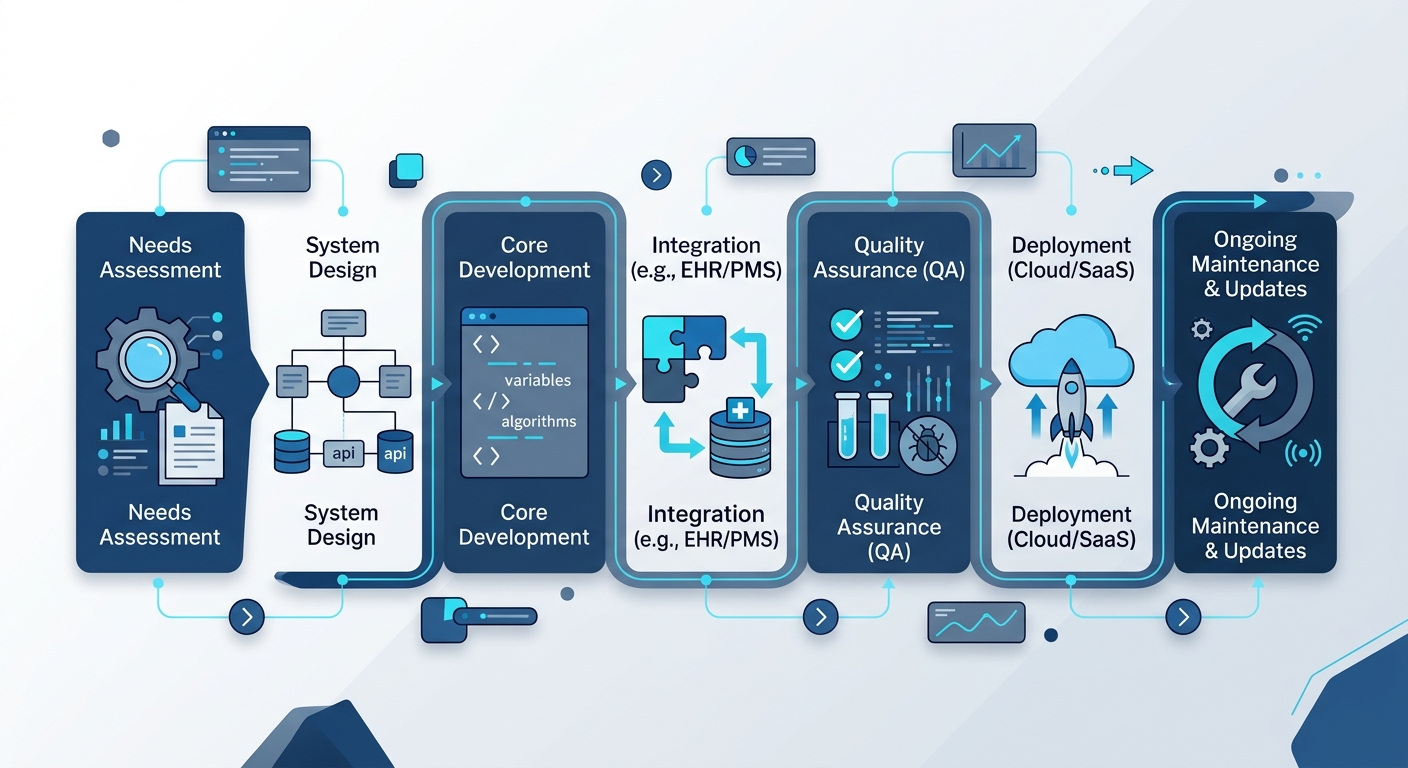
For product teams, CTOs, and retail pharmacy founders evaluating custom software development services, taking the custom route delivers full control over inventory logic, margins, hardware integrations, and compliance workflows. This medical shop POS development guide breaks down the engineering roadmap, architectural patterns, and integration steps necessary to deliver a production-ready pharmacy billing platform.
Step 1: Map Core Pharmacy ERP Features and Compliance Workflows
Before writing database schemas or selecting frameworks, product managers must outline the business rules unique to pharmacy operations. Unlike standard consumer goods, pharmaceutical products carry regulatory and clinical lifecycles that dictate software behavior.
- First-Expiry, First-Out (FEFO) Allocation: The billing engine must automatically suggest or enforce batches nearing expiration rather than simple FIFO (First-In, First-Out) models.
- Regulatory Drug Classifications: Systems must support strict tracking for Schedule H, H1, and X medications (under Indian regulations) or controlled substances internationally, requiring mandatory doctor registration numbers, patient details, and audit-ready digital registers.
- Multi-Tier Tax Logic: Automated calculation of localized taxes, including Goods and Services Tax (GST) slabs (0%, 5%, 12%, 18%), HSN code validation, and dynamic tax invoice generation.
- Strip and Loose Unit Dispensing: The point of sale must process fractional units (e.g., selling 4 tablets from a 10-tablet strip) while maintaining precise inventory deductions without rounding errors.
Aligning these requirements early ensures your architecture integrates seamlessly with broader enterprise resource workflows, similar to modular solutions found across specialized business product suites.
Step 2: Design the Relational Database for Batch and Expiry Tracking
The core bottleneck in pharmacy management software development typically lies in poorly indexed inventory databases. Because medical stores stock identical formulations across multiple batches with different manufacturing dates, expiries, purchase costs, and maximum retail prices (MRP), your schema must decouple the base medicine definition from stock instances.
Normalized Schema Blueprint
A resilient schema separates catalog data from physical batches and billing line items:
- medicines: Stores immutable product data (name, generic chemical formulation, manufacturer, HSN code, Schedule category, storage conditions).
- medicine_batches: Stores operational batch metrics (foreign key to
medicines.id, batch number, expiry date, manufacturing date, purchase rate, MRP, packaging ratio). - inventory_stocks: Tracks physical storage (foreign key to
batch_id, warehouse/store location ID, available quantity, damaged/quarantined quantity). - bill_items: Maps sales transactions directly to a distinct
batch_idrather than a generic product ID, capturing exact tax rates and unit margins at the exact second of sale.
Ensure strict database constraints (such as non-negative stock counts and unique composite keys across medicine_id, batch_number, and store_id) run at the database engine level to eliminate race conditions during high-volume counter sales.
Step 3: Select the Pharmacy ERP Features and Tech Stack
Prescription data and financial transactions demand high consistency, low latency, and rock-solid uptime. Selecting the right stack ensures your custom pharmacy billing software balances real-time counter performance with enterprise analytical capabilities.
| Layer | Recommended Technology | Operational Justification |
|---|---|---|
| Frontend (POS UI) | React or Flutter | Cross-platform deployment across desktop terminals, tablets, and handheld devices with rapid keyboard-driven navigation support. |
| Backend Engine | Node.js (NestJS) or Go | High concurrency for processing real-time inventory queries and low-overhead microservices. |
| Primary Database | PostgreSQL | ACID compliance, native JSONB support for prescription attachments, and powerful indexing for fast batch searches. |
| Cache Layer | Redis | In-memory storage for active cashier sessions, product catalog caching, and fast barcode lookup tables. |
| Offline Sync | SQLite / IndexedDB with WatermelonDB | Ensures checkout terminals function without an active internet connection and sync back when connected. |
For organizations scaling into distributed networks, leveraging modern architectural principles outlined in SaaS for business automation ensures individual stores maintain local speed while head office retains real-time visibility.
Step 4: Implement Barcode Scanner and GST Module API Integrations
Billing speed directly impacts customer wait times. A robust medical shop POS must ingest input seamlessly from hardware peripherals while maintaining compliance with government tax portals.
Hardware Integration (1D/2D Scanners & Thermal Printers)
Barcode scanners typically operate in Human Interface Device (HID) keyboard emulation mode or via virtual COM ports. In web-based POS interfaces, implement hardware-level listeners using the WebHID API or structured keydown event buffers that capture high-speed string bursts, terminating on carriage returns:
- Configure scanner parsers to recognize GS1 DataMatrix barcodes containing the Global Trade Item Number (GTIN), batch number, and expiration date in a single scan.
- Interface with thermal receipt printers using raw ESC/POS protocol commands via direct network sockets (TCP/IP) or WebUSB, eliminating operating system print dialog delays.
Automating GST Invoicing via APIs
In jurisdictions requiring electronic invoicing and GST validation, integrate billing endpoints directly with government-authorized GST Suvidha Providers (GSPs) or national portals:
- Payload Construction: Transform bill records into JSON schemas matching national standards (validating 8-digit HSN codes, state codes, CGST/SGST/IGST breakdowns).
- IRN & QR Code Generation: Make asynchronous calls to fetch the Invoice Reference Number (IRN) and digitally signed QR code string.
- Payload Persistence: Store the generated signature and IRN against the local invoice record and render the verifiable cryptographic QR code on the physical thermal receipt.
Step 5: Build Offline-First Counter Functionality
Network latency or broadband outages should never halt a counter transaction. When determining how to build a custom pharmacy billing software, prioritize an offline-first architecture.
Equip the desktop or web client with an embedded local cache (such as SQLite via Electron or IndexedDB in modern browsers). The terminal executes stock subtractions locally against cached batch tables, generates local sequential invoice tokens, and prints receipts instantly. A background background sync service pushes closed invoices to the central cloud server via WebSockets or HTTPS batch endpoints as connectivity resumes, resolving distributed conflicts using deterministic timestamped version vectors.
Step 6: Deploy Scalable Cloud Infrastructure with Cost Optimization
Hosting infrastructure should scale efficiently across store counts without incurring steep flat-rate server charges. Cloud engineering teams should balance reliability with resource consumption.
- Containerized Deployments: Package your backend services using Docker, orchestrating instances across managed container environments such as AWS ECS or Google Cloud Run. These serverless container platforms scale down to zero or baseline capacity during nighttime store closures, cutting operational compute costs.
- Database Sizing & Read Replicas: Deploy managed relational databases (such as Amazon RDS for PostgreSQL). Route heavy analytical workloads (e.g., historical sales audits, dead-stock forecasting, tax summaries) to dedicated read replicas, keeping the primary cluster unblocked for counter billing.
- Storage Tiering for Digital Prescriptions: Store patient prescription uploads in Amazon S3 or Google Cloud Storage, applying lifecycle policies that transition files from Standard storage to Infrequent Access (IA) or Glacier after 90 days to minimize ongoing object storage overhead. Refer to official AWS documentation to configure optimal lifecycle transition rules.
For custom rollouts requiring multi-region deployment or hybrid setups, partnering with specialized software engineering teams ensures your infrastructure achieves regulatory isolation without unnecessary compute overhead.
Step 7: Conduct Compliance Audits, Performance Tuning, and Rollout
Deploying software inside clinical and retail healthcare settings requires stringent testing beyond standard functional unit tests:
- Concurrency Testing: Simulate peak-hour loads (e.g., 50 parallel terminals executing 20 item checkouts simultaneously) to measure database lock contention on shared inventory tables.
- Audit Log Immutability: Verify that modifications to narcotic ledgers, purchase rate adjustments, and invoice cancellations produce immutable, append-only system audit trails that log timestamp, terminal IP, and staff identifier.
- User Acceptance with Pharmacy Staff: Measure the keyboard-only ergonomics of the checkout screen. A seasoned pharmacy cashier should be able to look up a generic salt, select an available batch, split a strip, apply doctor details, and trigger receipt printing without using a mouse.
Pharmacy Billing Software: Key Differences From Standard POS
To understand why custom engineering is necessary, consider how a dedicated medical POS compares to standard retail billing platforms:
| Functional Area | Generic Retail POS | Custom Pharmacy Billing Software |
|---|---|---|
| Inventory Allocation | Simple SKU subtraction (FIFO) | Strict FEFO driven by verified batch expiration dates |
| Unit Flexibility | Single or static pack units | Dynamic strip/box fractional calculations with decimal precision |
| Regulatory Oversight | Standard sales receipts | Controlled drug registers, doctor registration tracking, patient IDs |
| Substitutions | Manual item lookup | Generic salt/molecule cross-referencing and therapeutic alternates |
| Tax & Compliance | Uniform GST rates | Complex HSN-level tax splits, automated e-way bill and IRN generation |
Frequently Asked Questions
How does pharmacy billing software handle medicine substitutions?
Custom systems index medicines by their international nonproprietary name (INN) or active chemical composition alongside the brand name. When a customer presents a prescription for an out-of-stock brand, the billing engine queries the database for identical formulations, strengths, and dosage forms available in active stock, enabling the pharmacist to dispense compliant generic equivalents safely.
Can custom pharmacy software run on existing point-of-sale hardware?
Yes. By adopting standards-compliant web technologies or lightweight desktop application runtimes (such as Electron or Flutter Desktop), modern pharmacy software interfaces directly with standard USB/Bluetooth handheld barcode scanners, ESC/POS thermal receipt printers, and cash drawers without proprietary hardware lock-in.
What is the most effective approach for handling expired medicine returns?
An enterprise pharmacy billing platform provides automated near-expiry alert modules (30, 60, and 90-day warning windows). The inventory engine isolates near-expiry batches from the active counter billing pool and creates automated Debit Notes linked to the original supplier’s purchase ledger, streamlining returns and credit reconciliation before products reach their expiration date.