
Modern automation architectures frequently encounter an operational boundary: visual workflow orchestrators excel at managing API handoffs, scheduling, and state management, but they struggle with compute-heavy data processing, custom algorithmic transformations, or proprietary business logic. Running resource-intensive JavaScript directly inside workflow memory can degrade host performance and lead to out-of-memory errors in high-throughput environments.
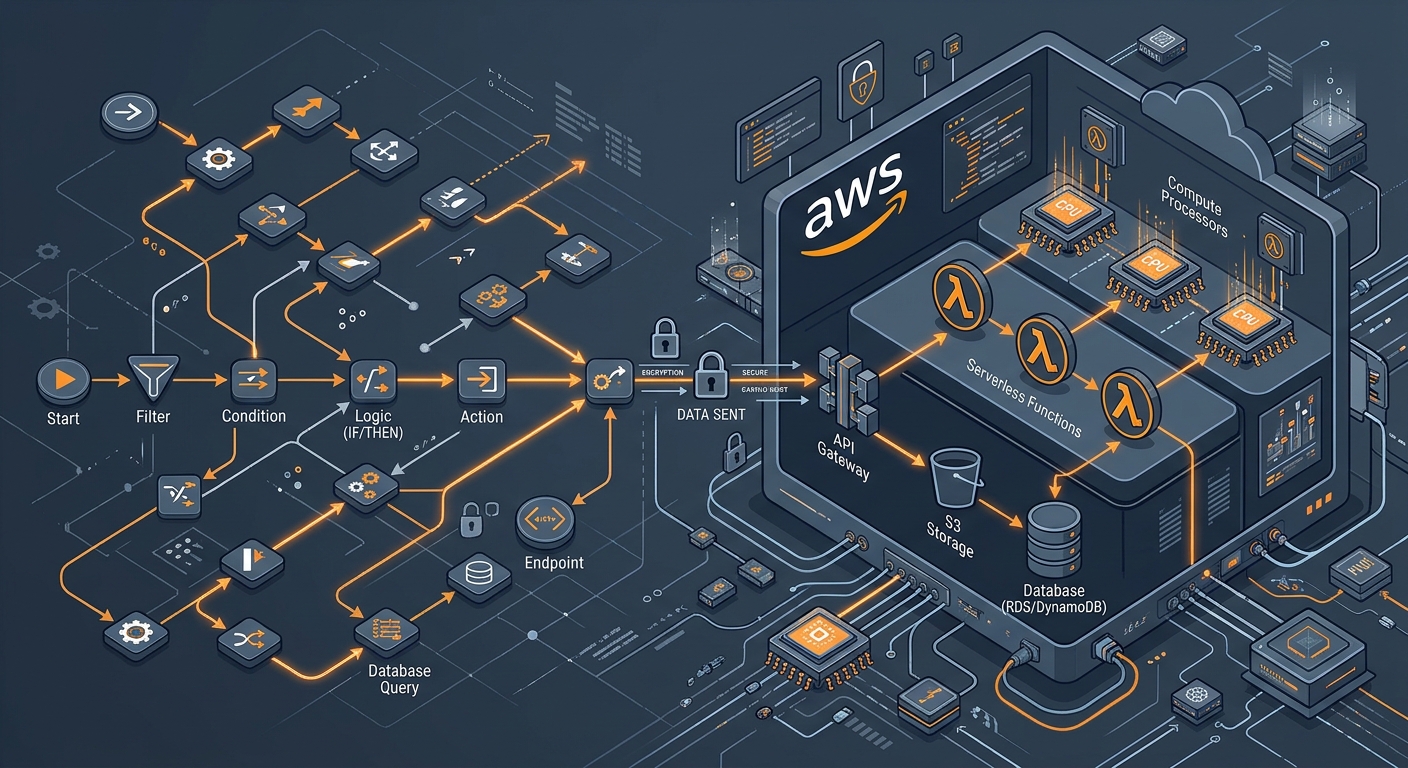
By pairing n8n AWS Lambda execution, engineering teams decouple orchestrator control logic from stateless compute. In this model, n8n functions as the central nervous system—listening for webhook triggers, polling queues, and routing records—while AWS Lambda serves as the isolated compute engine executing Python, Go, Node.js, or Rust functions on demand. Understanding how to integrate n8n with AWS Lambda for serverless workflows enables organizations to build scalable data pipelines without accumulating technical debt or paying excessive monthly subscription fees for rigid third-party integration platforms.
Architectural Patterns for Serverless Workflow Automation with n8n and AWS
Before provisioning IAM policies or dropping nodes into the n8n canvas, you need to select the execution topology that matches your latency, concurrency, and volume requirements. Three primary architectural patterns dominate production environments:
- Synchronous Request-Response (Direct Invocation): n8n triggers the Lambda function via an API call and halts workflow execution until the function returns a response payload. This pattern fits validation tasks, signature verification, complex calculations, and on-the-fly document manipulation where subsequent nodes require the function’s immediate output.
- Asynchronous Decoupled Execution (Fire-and-Forget): n8n triggers Lambda with an asynchronous invocation type (
InvocationType: Event). AWS places the event into an internal queue and returns an HTTP 202 status code instantly. This pattern is ideal for video transcoding, large-scale batch database updates, and external indexing tasks where n8n does not need to wait for the final payload. - Queue-Buffered Pipeline (Dead-Letter Supported): Instead of invoking Lambda directly, n8n publishes payloads to an Amazon Simple Queue Service (SQS) FIFO queue or Amazon SNS topic. Lambda polls the queue in managed batches. This protects downstream systems from spike loads and provides native Dead-Letter Queue (DLQ) support for unhandled exceptions.
n8n AWS Lambda Integration: 7 Steps to Production-Ready Serverless Workflows
Setting up a production-ready n8n lambda node integration requires careful planning around security, payload handling, and error routing. Follow these seven concrete implementation steps.
Step 1: Define Function Execution Boundaries
Establish strict operational boundaries for what runs in n8n versus what belongs in AWS Lambda. Keep API orchestrations, alerting (Slack, email), condition branching, and human-in-the-loop approvals inside n8n. Offload CPU-heavy routines—such as CSV parsing exceeding 10 MB, cryptographic hashing, machine learning model inferences, and nested matrix transformations—to AWS Lambda.
Step 2: Configure Least-Privilege IAM Roles and Policies
A frequent security misstep is configuring n8n with administrator or broad AWSLambdaFullAccess credentials. Production n8n deployments must use an IAM user or role restricted strictly to invoking specific functions within designated regions.
Create an IAM policy that grants invocation privileges exclusively to target Amazon Resource Names (ARNs):
{
  "Version": "2012-10-17",
  "Statement": [
    {
      "Sid": "AllowN8nLambdaInvoke",
      "Effect": "Allow",
      "Action": [
        "lambda:InvokeFunction"
      ],
      "Resource": [
        "arn:aws:lambda:us-east-1:123456789012:function:DataSanitizationProcessor",
        "arn:aws:lambda:us-east-1:123456789012:function:CustomPDFGenerator"
      ]
    }
  ]
}
If hosting n8n on Amazon Elastic Compute Cloud (EC2) or Elastic Kubernetes Service (EKS), use AWS IAM Roles for Service Accounts (IRSA) or EC2 Instance Metadata Service (IMDSv2) instead of static access keys to eliminate hardcoded credentials entirely.
Step 3: Establish AWS Credentials in n8n
To configure your connection in n8n:
- Navigate to Credentials > New Credential and search for AWS.
- Enter your Access Key ID and Secret Access Key (or assume a role ARN if operating across multi-account AWS organizations).
- Specify your default AWS Region (e.g.,
us-east-1,ap-south-1). Ensure the region matches where your Lambda functions reside to prevent cross-region network latency penalties.
Refer to the official n8n documentation for detailed credential management practices, and consult AWS Documentation for current security guidelines regarding IAM credential rotation.
Step 4: Configure the n8n Lambda Node Integration
Add the AWS Lambda node to your workflow canvas:
- Resource: Select Function.
- Operation: Select Invoke.
- Function Name: Enter the function name or provide the full ARN dynamically using expressions.
- Invocation Type: Choose RequestResponse (synchronous execution requiring output data) or Event (asynchronous background execution).
- Qualifier: Reference a specific function version or deployment alias (such as
prodorstage) rather than defaulting blindly to$LATEST. This prevents unexpected schema mismatches when functions are deployed independently of n8n workflows.
Step 5: Transform High-Volume Payloads and Handle Data Limits
AWS Lambda imposes strict invocation payload limits: 6 MB for synchronous requests and 256 KB for asynchronous events. Passing raw binary payloads or giant data arrays directly from n8n will result in a 413 RequestEntityTooLargeException.
For high-volume data transformation:
- Use Object Storage as an Intermediary: When orchestrating files larger than 5 MB, use n8n's AWS S3 node to upload the raw artifact to an S3 bucket, then pass only the bucket name and object key in the Lambda payload.
- Normalize Payload Structures: Wrap JSON input inside an explicit key (e.g.,
{ "body": $json }). Lambda functions running Python or Node runtime wrappers expect standardized event objects. Use n8n’s Code or Edit Fields (Set) node to strip unused API metadata before invoking Lambda, reducing bandwidth and parsing overhead.
Step 6: Implement Enterprise Error Handling and Retries
Serverless workflows must be resilient against transient failures, execution timeouts, and downstream API rate limits. Configure your n8n workflow to intercept Lambda execution errors reliably:
- Check Handled Errors: When an AWS Lambda function fails inside its own runtime (e.g., an uncaught Python exception), AWS returns an HTTP 200 response containing a top-level field
FunctionError: "Unhandled"alongside the stack trace. Enable Always Output Data on the n8n node, followed by an If node evaluating whether$json.errorMessageexists. - Configure Node Retries: Enable Retry On Fail in the AWS Lambda node settings. Set 3 retry attempts with exponential backoff (starting at 1,000 ms) to survive transient AWS resource contention or cold-start timeouts.
- Error Workflow Routing: Direct failed events into a dedicated error workflow or send a payload into a monitored messaging channel using notification nodes to maintain end-to-end auditability.
Step 7: Instrument Monitoring, Logging, and Cost Tracking
Monitor your distributed serverless pipeline by establishing traceability across both environments:
- Pass a unique execution correlation ID (
executionId: $execution.id) in the Lambda event payload. Have your Lambda code log this ID via AWS CloudWatch. If an issue occurs, you can search CloudWatch Logs using CloudWatch Logs Insights to reconcile the specific execution trace with n8n history. - Apply AWS resource tags (e.g.,
Environment: Production,ManagedBy: n8n) directly to your Lambda functions to allocate AWS Cost Explorer billing accurately back to operational units.
Cost Breakdown: n8n + Lambda vs. Proprietary iPaaS Tools
Many organizations rely on hosted proprietary integration platforms (such as Zapier, Make, or Workato) that bill strictly per task or operation. When enterprise pipelines process hundreds of thousands of records each month, per-operation pricing becomes unsustainable.
Deploying scalable cloud architectures with self-hosted n8n and AWS Lambda offers significant cost advantages:
| Execution Profile (Monthly) | Proprietary iPaaS (Per-Task SaaS) | n8n (Self-Hosted) + AWS Lambda | Primary Cost Driver |
|---|---|---|---|
| 100,000 runs Light JSON transforms (256MB RAM, 300ms) |
~$100 – $250 / month | ~$10 – $25 / month (Base VPS + negligible Lambda compute) |
iPaaS task meters; Lambda falls largely within AWS Free Tier limits (first 1M requests/mo free). |
| 1,000,000 runs Data enrichment & DB writes (512MB RAM, 800ms) |
~$800 – $2,000 / month | ~$45 – $75 / month ($20 VPS hosting n8n + ~$30 AWS Lambda compute & logs) |
iPaaS charge tiers expand exponentially; Lambda scales linearly based purely on millisecond execution duration. |
| 5,000,000 runs High-throughput ETL / webhook batching |
Enterprise tiers ($3,000+ / mo) | ~$150 – $300 / month (Multi-worker n8n cluster + AWS Lambda & SQS queues) |
Contract limits, custom connector lock-ins, and payload size overage penalties. |
Organizations standardizing on modern stacks can leverage cloud-native automation infrastructure to scale throughput without incurring unpredictable usage penalties.
Production Best Practices for Scale and Security
To keep your workflows secure and reliable as transaction volumes increase, keep the following rules in mind:
- VPC Configuration: If your Lambda function accesses private database clusters (such as Amazon RDS or Aurora instances inside private subnets), configure your Lambda within that VPC. Ensure you have Amazon VPC Endpoints (PrivateLink) configured for AWS services to prevent network routing through the public internet.
- Cold Start Mitigation: If using runtimes with heavier initialization overhead (such as Java or complex Python packages with heavy dependencies like Pandas), configure Provisioned Concurrency for customer-facing or real-time webhooks orchestrated through n8n.
- Modular Function Design: Keep your Lambda functions micro-scoped. Avoid creating a single monolithic function that handles every edge case. Distinct, single-purpose functions (e.g.,
generate-invoice-pdf,validate-gst-payload) are far easier to maintain, unit-test, and update independently inside n8n flows.
For organizations scaling complex automated business operations, adopting custom AI and automation solutions bridges the gap between drag-and-drop workflow design and resilient enterprise engineering.