
Off-the-shelf enterprise resource planning (ERP) suites are notorious for rigid workflows, steep recurring licensing fees, and bloat. For growing small and medium-sized enterprises (SMEs), paying for hundreds of features that your team will never touch while struggling to shoehorn your unique operational flows into pre-packaged molds is a losing battle. Investing in custom erp software allows a business to build tailored functionality, retain complete ownership of its operational data, and scale infrastructure sustainably.
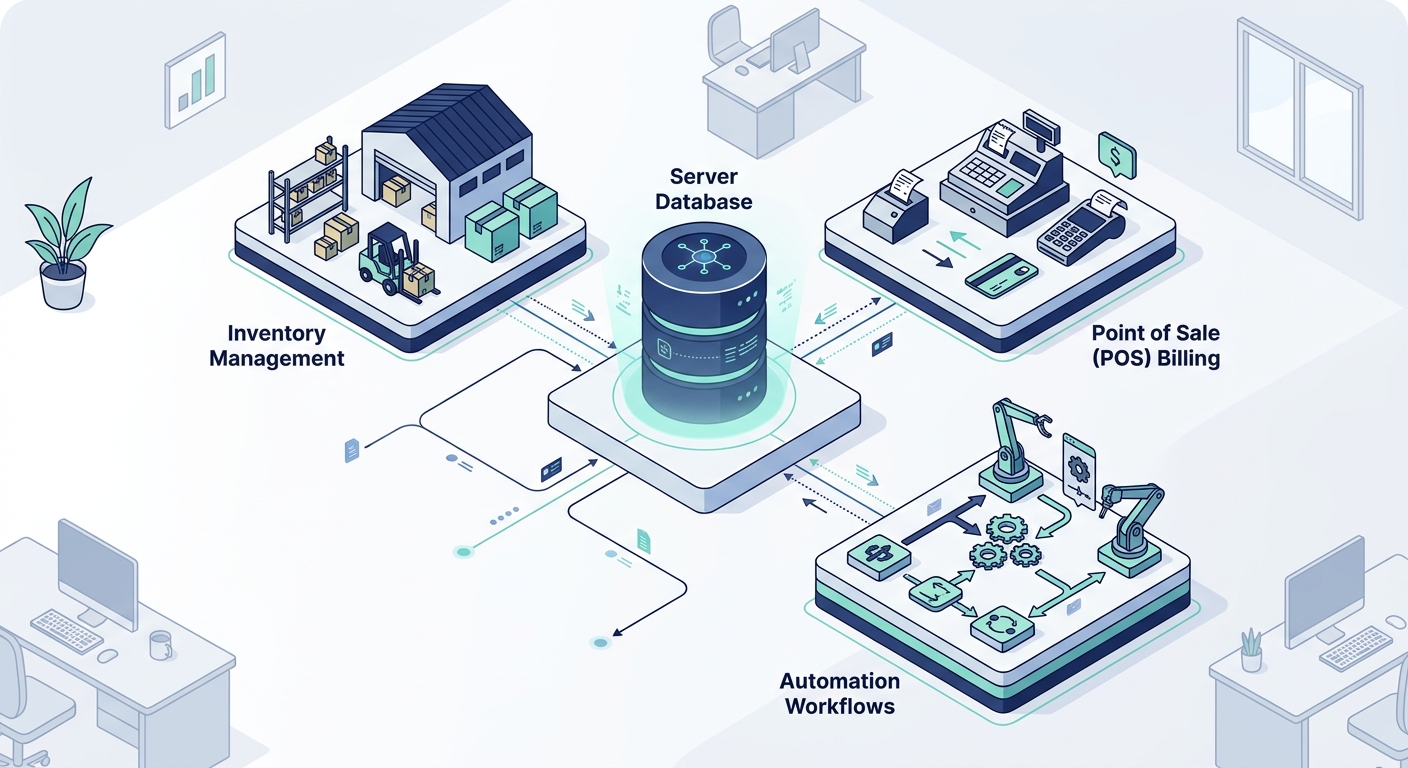
However, undertaking custom erp development for small business requires disciplined planning. Without a clear technical blueprint and modular scope, internal software initiatives risk ballooning budgets and delayed rollouts. This guide outlines a structured, 7-step methodology to build your own erp system without enterprise-grade overhead.
The Core Modular Blueprint: Start Lean
The most common failure mode in custom software delivery is attempting to rebuild an entire platform like SAP or NetSuite in a single release. Successful SMEs avoid this by adopting a modular architecture that delivers value incrementally. Rather than attempting an all-in-one overhaul, begin with the two operational functions that dictate daily cash flow: inventory tracking and transaction billing.
| Phase | Target Modules | Primary Business Objective |
|---|---|---|
| Phase 1: Foundation | Inventory Ledger, POS & GST Billing, Customer/Vendor Directory | Eliminate stock discrepancies and streamline order-to-cash turnaround. |
| Phase 2: Operations | Procurement, Order Fulfillment, Automated Invoicing | Automate supplier POs, goods receipts, and shipment status tracking. |
| Phase 3: Intelligence | Financial Analytics, AI Workflows, Predictive Reordering | Remove manual reconciliations and forecast supply chain needs. |
Step 1: Audit Current Workflows and Define Data Ownership
Before writing a single line of code, document the exact lifecycle of an order from initial customer inquiry to final reconciliation. Identify where data bottlenecks occur: are warehouse workers recording stock on paper sheets? Is your sales team managing customer accounts across disconnected spreadsheets while accounting uses standalone software?
Understanding how to build custom erp software for small business starts with defining your data schema early. Map out every field your team touches—SKUs, batch numbers, tax rates, vendor terms, and audit trails. Identifying your single source of truth prevents data duplication and clarifies exactly which manual handoffs can be automated.
Step 2: Choose a Cost-Effective, Scalable Technical Architecture
A lean SME budget demands an architecture that is dependable, standard-compliant, and inexpensive to host at lower initial volumes. Rather than deploying over-engineered microservices, a modular monolith using containerized services is often the sweet spot for maintainability and speed.
- Backend Framework: Mature, typed frameworks such as Node.js (NestJS), Python (FastAPI/Django), or Go provide rich developer ecosystems, out-of-the-box security, and rapid API generation.
- Database Layer: Relational databases like PostgreSQL are non-negotiable for ERPs. Transactions require ACID compliance to guarantee that inventory counts and ledger balances remain mathematically consistent across concurrent sessions.
- Frontend Interface: Modern component libraries built on React or Flutter for cross-platform mobile access ensure staff can scan barcodes, generate receipts, and update records from warehouse floors or retail counters.
- Cloud Infrastructure: Host the system using containerized environments like Docker on managed infrastructure such as Amazon Web Services (AWS) or Google Cloud Platform to maintain predictable utility-based hosting costs.
If you are planning your core technology stack, reviewing established engineering frameworks through our guide to custom software development services can provide practical implementation clarity.
Step 3: Scope and Build the Core Inventory and Billing Engine
Do not begin by building HR modules or complex marketing analytics. Center your minimum viable product (MVP) on daily transactional mechanics: stock movements and billing generation.
Your inventory module must support real-time decrementing upon order completion, multi-warehouse or retail shelf visibility, and automated alerts for low stock thresholds. Simultaneously, your billing module must adhere directly to local financial regulations—such as standardized tax breakdowns, tax invoice numbering protocols, and point-of-sale receipt output. To explore pre-architected operational modules tailored for retail and distribution, evaluate how focused suites like Applizor Products handle inventory and retail POS workflows.
Step 4: Connect Existing POS, Retail, and Accounting Touchpoints
A custom ERP should not operate in an isolated silo. Most SMEs already rely on external payment terminals, legacy accounting software, or e-commerce storefronts. A critical phase of development involves establishing resilient REST or GraphQL APIs to synchronize transactional events.
Design bidirectional webhooks for external platforms. For instance, when an order closes on your retail POS or WooCommerce store, an event webhook should immediately decrement central inventory and log a pending receivable in the ERP ledger. Structuring these interfaces with defensive error handling and queuing ensures that transient network failures do not result in dropped transactions or corrupted books.
Step 5: Integrate Pragmatic AI and Workflow Automation
Modern ERP development does not mean writing every routine script from scratch. You can significantly reduce engineering hours and operational overhead by bridging custom code with modern orchestration tools.
Using workflow orchestration platforms like n8n documentation details, you can trigger complex background tasks without bloating your core backend. For example, an n8n webhook can listen for new invoice generation events in your custom ERP, convert the record to a structured PDF, push a payment reminder via WhatsApp or email, and update external logs.
Furthermore, integrating retrieval-augmented generation (RAG) knowledge bases allows operational leaders to query internal business data using plain language prompts—such as querying stock turnover velocity across specific quarters. Teams evaluating these hybrid capabilities can explore our technical breakdown of AI automation software development services to see how automated agents interact with operational databases.
Step 6: Implement Granular Role-Based Access Control (RBAC)
Data security within an ERP system is fundamentally about authorization boundaries. A cashier or warehouse associate should not have visibility into supplier margins, company-wide balance sheets, or payroll records. Build explicit role-based access control (RBAC) into the database model from day one.
- Row-Level Security: Restrict sales reps or store managers to viewing only orders and customer records tied to their assigned territory or store branch.
- Audit Logging: Maintain immutable audit logs tracking who updated stock quantities, modified unit pricing, or approved manual discounts.
- Token-Based Authentication: Secure all API endpoints with short-lived JWTs (JSON Web Tokens) or OAuth2 protocols paired with encrypted credential storage.
Step 7: Execute Phased User Acceptance Testing and Deployment
A sudden, hard cutover to a newly built ERP is high-risk for any business. Instead, execute deployment using a parallel-run strategy. For a window of two to four weeks, run the new custom ERP simultaneously with your existing legacy spreadsheets or billing systems.
Compare transaction outputs, tax totals, and stock balance numbers daily. This parallel verification catches subtle schema errors or workflow friction before retiring your fallback options. Train department leads thoroughly during this stage to build operational confidence across your workforce.
Architecture Comparison: Custom Build vs. SaaS vs. No-Code
| Factor | Custom Engineering | SaaS Subscription | No-Code / Low-Code |
|---|---|---|---|
| Data Ownership | 100% proprietary database control | Stored in third-party vendor cloud | Tied to proprietary app builder engine |
| Recurring Fees | Hosting and maintenance only | Per-seat monthly subscription | App builder platform tiers + database fees |
| Workflow Fit | Precision match to your business operations | Rigid; requires operational compromises | Flexible initially; restricted by platform limits |
| Long-Term Scalability | High; optimize queries and scale containers | High; but costs scale linearly per user | Limited by platform execution and record caps |
To inspect standard deployment stacks and infrastructural blueprints suitable for custom platforms, review the architectural methodologies in our engineering and technology overview.
Frequently Asked Questions
How long does custom ERP development for small business usually take?
A scoped MVP focusing on foundational modules—such as inventory tracking, POS, and basic invoicing—typically takes between 8 and 16 weeks to design, develop, and test. Staging the platform into modular releases ensures daily operations benefit from automation long before the full platform is completed.
Why build your own ERP system instead of buying off-the-shelf software?
Commercial ERP platforms frequently charge steep per-user monthly licenses, penalizing business growth. Over time, recurring SaaS fees exceed the one-time development and maintenance cost of a proprietary tool. Additionally, custom software aligns exactly with your operational competitive advantages rather than forcing your business into rigid, standardized processes.
Can a custom ERP connect with legacy hardware like barcode scanners and receipt printers?
Yes. Custom frontends developed with web or mobile technologies interface seamlessly with standard peripheral hardware via WebUSB, Bluetooth, or local network drivers. This ensures warehouse and retail teams retain hardware efficiency without requiring proprietary terminal equipment.