
Retail operations live and die by stock accuracy. When an omnichannel merchant sells an item online that was just purchased off the rack at a physical outlet, the result is an immediate backorder, a frustrated customer, and operational churn. While off-the-shelf SaaS inventory platforms work well for standard catalog setups, rapidly growing retailers often face rigid constraints: per-user licensing fees that discourage floor staff adoption, vendor lock-in, and an inability to adapt to custom supply chain workflows.
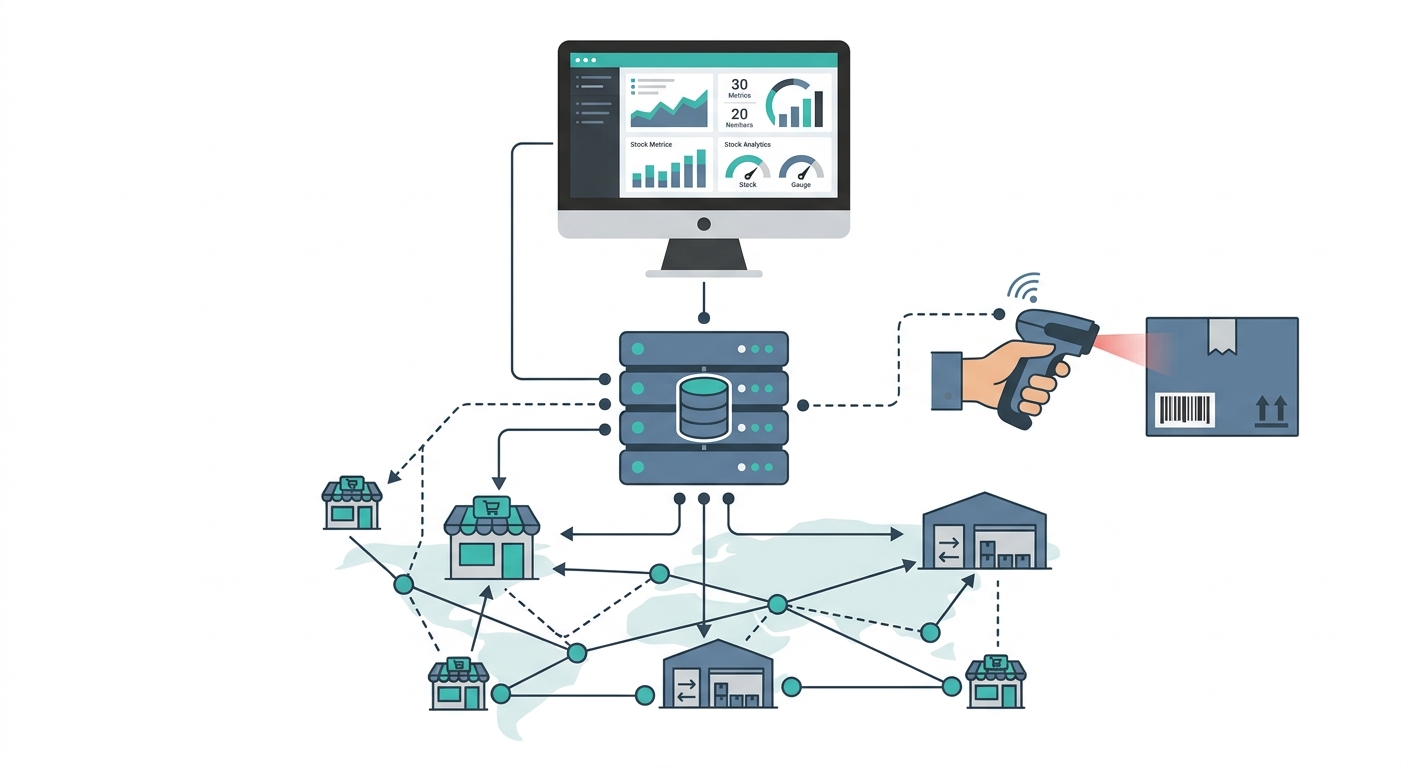
Building a tailor-made system allows retail businesses to model stock allocations precisely according to their physical infrastructure. This guide breaks down the engineering requirements, data architectures, and inventory management software development steps required to deploy a resilient, high-performance solution.
Why Retailers Outgrow SaaS and Choose Custom Inventory Management
Pre-packaged retail software assumes a standardized operating model: a warehouse feeds a store, which sells to a customer. Modern retail rarely operates in such straight lines. Merchants frequently leverage store-to-store transfers, showrooming, drop-shipping from local suppliers, consignment bins, and split-batch fulfillment.
Opting for custom inventory management delivers three critical strategic advantages:
- Elimination of Seat Tax: Standard platforms charge per user or per location. A custom platform allows unrestricted access across store clerks, stockroom associates, purchasing officers, and external auditors without increasing monthly software overhead.
- Bespoke Hardware and Workflow Integration: Off-the-shelf tools often dictate which barcode scanners, receipt printers, or mobile computers can be used. Custom software integrates directly with open hardware standards and custom operational processes.
- Complete Data Ownership and Low-Latency Sync: Transactional data remains within private infrastructure, allowing for real-time queries across millions of SKU permutations without meeting external API rate limits.
For organizations evaluating these trade-offs, engineering a bespoke system via dedicated custom software development services ensures the technical foundation matches operational reality from day one.
Core System Architecture: Node.js, React, and Relational Data Stores
Retail inventory engines must manage high write concurrency. During peak sales periods or seasonal promotions, thousands of point-of-sale (POS) terminals and e-commerce checkouts update inventory balances simultaneously. A robust stack must guarantee strict transactional consistency (ACID compliance) while serving fast reads to floor associates.
The Recommended Tech Stack
- Backend Application Layer: Built with Node.js (utilizing Fastify or NestJS). Node’s asynchronous event loop handles concurrent HTTP requests from POS terminals and webhooks cleanly, while TypeScript provides compile-time safety across inventory payloads.
- Frontend Layer: Built using React for desktop back-office dashboards and management consoles. For floor staff and handheld stockroom devices, a responsive Progressive Web App (PWA) or a cross-platform mobile framework ensures native access to device cameras for barcode scanning.
- Database Layer: PostgreSQL serves as the central operational database. Because stock movements require strict atomicity, relational databases with row-level locking (such as
SELECT FOR UPDATE) prevent race conditions that cause double-selling. - Caching & Message Queue: Redis for high-speed in-memory caching of read-heavy product catalogs, and message brokers (such as RabbitMQ or Redis Streams) to buffer asynchronous events like batch adjustments and third-party marketplace updates.
Database Schema Design for Retail SKU and Location Tracking
A frequent failure mode in inventory software is storing inventory as a simple numeric column on a product row (e.g., products.stock_count = 12). This approach provides zero auditability, fails across multiple stores, and makes tracking inventory in transit impossible.
Enterprise-grade inventory systems rely on a double-entry inventory ledger. The current balance is derived from an immutable history of stock transactions, backed by location-specific balance tables for query performance.
Key Relational Tables
| Table Name | Key Columns | Operational Purpose |
|---|---|---|
locations |
id, name, type (warehouse, store, transit), address |
Maps every physical stock holding point, from regional distribution hubs to shelf bins. |
products |
id, title, brand, category_id |
Stores parent product attributes independent of specific variants. |
skus |
id, product_id, sku_code, barcode, cost_price, retail_price |
Represents sellable stock keeping units, including variant details (e.g., Size, Color). |
inventory_balances |
sku_id, location_id, on_hand, allocated, reserved |
Aggregated counter for fast reads; updated via atomic database transactions. |
stock_ledger_entries |
id, sku_id, from_location_id, to_location_id, quantity, reference_type, reference_id, created_at |
Immutable log of every item movement (Sales, Returns, Purchase Orders, Wastage, Adjustments). |
To calculate actual available-to-promise (ATP) inventory, the system computes: ATP = on_hand - allocated - reserved. This prevents orders from pulling items that are sitting in an unfulfilled online shopping cart or reserved for in-store pickup.
How to Build a Custom Inventory Management System for Retail: 7 Proven Steps
Step 1: Map Retail Workflows and Physical Topology
Before writing code, outline the movement of goods through the physical enterprise. Define whether stock moves strictly from distribution centers to retail shops, or if stores can fulfill orders for neighboring outlets. Document all shrinkage reasons (damage, theft, sampling) and tax implications, particularly if operating under multi-state GST or regional sales taxes.
Step 2: Prioritize Custom Inventory Management System Features
Avoid building every possible ERP capability in version one. Prioritize these baseline custom inventory management system features:
- Centralized SKU catalog with multi-attribute variants.
- Multi-store and multi-warehouse inventory tracking.
- Automated reorder triggers based on static safety stock thresholds.
- Goods Received Notes (GRN) matching against Purchase Orders (POs).
- Complete audit log of manual stock adjustments with mandatory reason codes.
For operations aiming to consolidate custom tracking with billing, exploring specialized retail and inventory management solutions can help define whether to build entirely from scratch or integrate with tailored modules.
Step 3: Design the Transaction-Safe Database Architecture
Implement the normalized schema detailed above. Configure database indexes on (sku_id, location_id) and unique constraints on barcode and sku_code. Build stored procedures or application-level transactional blocks using strict isolation levels to guarantee that an item cannot be checked out simultaneously by an e-commerce gateway and a physical POS terminal.
Step 4: Develop Core Services and API Endpoints
Structure the backend around domain-driven modules: Catalog, Inventory, Purchasing, and Audit. Create RESTful or GraphQL endpoints designed for operational resilience. For example, build idempotent endpoints for stock deductions so that if a spotty network connection causes a store terminal to submit a checkout payload twice, the system applies the deduction only once.
Step 5: Integrate POS Terminals and Barcode Hardware
Retail hardware operates on diverse protocols. To connect hardware smoothly:
- Barcode Scanners: Standard USB or Bluetooth scanners operate in Human Interface Device (HID) mode, effectively acting as high-speed keyboards. Configure your frontend web application with event listeners that detect rapid input sequences followed by an Enter key, parsing the barcode into an item lookup query.
- POS Billing Integration: Expose a low-latency endpoint that the POS invokes during item scanning to verify stock presence, followed by an atomic decrement call upon payment capture.
- Mobile Floor Scanning: Leverage modern browser WebRTC APIs or native device SDKs within a mobile shell to scan 1D and 2D barcodes directly through device cameras, avoiding expensive proprietary terminals.
Step 6: Build Role-Based Dashboards and Floor Interfaces
Different retail team members require distinct views:
- Store Clerks: Require a minimalist, high-contrast, touch-friendly screen optimized for quickly checking stock at nearby stores or receiving incoming transfers.
- Warehouse Operators: Require bulk verification screens, bin-picking lists, and dispatch verification panels.
- Procurement Managers: Require analytical dashboards highlighting inventory turnover rates, days of inventory remaining (DIR), and low-stock indicators.
Deploying specialized software engineering services allows teams to craft tailored UI/UX workflows for each operational cohort, reducing data entry errors on the shop floor.
Step 7: Conduct Sandbox Validation, Load Testing, and Pilot Rollout
Never roll out a new inventory system to an entire retail chain at once. Execute stress testing by simulating peak transaction volumes—such as 100 simultaneous sales calls per second across identical SKUs—to verify that row-locking mechanisms hold without deadlocking the database.
Pilot the system at a single physical store alongside existing processes for a minimum of two weeks. Reconcile physical inventory counts against the ledger daily to catch edge cases, such as handling split-payment voids or damaged-item write-offs, before expanding to other locations.
Hardware Integration Roadmap: Scanners, Scales, and Mobile Devices
Connecting software to the physical retail floor requires a structured hardware strategy:
- Evaluation Phase: Audit the existing fleet of handheld terminals, thermal receipt printers (ESC/POS protocol), and barcode scanners. Identify whether equipment uses USB, Serial, Bluetooth, or IP connections.
- Driver and Communication Layer: Choose between browser-based Web Serial/WebUSB APIs for direct tethering, or lightweight local middleware (e.g., an Electron or Go background service running on the POS terminal) that exposes a local WebSocket server to relay scanner events to the web app.
- Label Printing Automation: Build automated ZPL (Zebra Programming Language) or ESC/Label generators on the backend so warehouse staff can generate accurate barcode labels directly onto incoming boxes during the receiving process.
Cost and Timeline Estimations for Retail SMEs
The budget and delivery schedule to build inventory software for retail depend on operational complexity, number of physical locations, and third-party integrations.
| Project Phase | Scope & Deliverables | Typical Timeline |
|---|---|---|
| Discovery & Architecture | Workflow mapping, database schema design, hardware audit, UX wireframes. | 2 to 4 Weeks |
| Core Engine (MVP) | Catalog management, multi-location stock ledger, basic POS APIs, user permissions. | 6 to 8 Weeks |
| Hardware & Integrations | Barcode scanner event handling, thermal label generation, ERP/accounting hooks. | 3 to 5 Weeks |
| Testing & Store Pilot | Concurrency load testing, physical inventory reconciliation, pilot store deployment. | 3 to 4 Weeks |
| Total Implementation | End-to-end custom inventory solution ready for phased chain-wide rollout. | 14 to 21 Weeks |
For small to mid-sized retailers, building a custom platform involves an upfront capital investment in software engineering rather than an operational subscription expense. Within 12 to 24 months, many retailers find that savings from eliminating recurring SaaS license fees, avoiding overstocking through precise visibility, and preventing stockouts yield a compelling return on investment.
Frequently Asked Questions
Can a custom inventory system work offline if an outlet loses internet?
Yes. By utilizing local storage (such as IndexedDB within a PWA or SQLite inside an Electron desktop app), the POS and inventory interface can record transactions locally. When connectivity is restored, the client pushes queued operations to the central server. The backend must be architected with conflict-resolution rules—such as timestamp-based reconciliation—to handle cases where the same SKU was sold online while the store was offline.
How do we migrate from spreadsheets to custom inventory software without operational downtime?
The standard process involves running a data freeze weekend or conducting rolling store-by-store audits. Historical product data is sanitized and imported via automated ETL scripts. Immediately prior to go-live, staff perform a full physical inventory count, which is uploaded directly into the inventory_balances and initial stock_ledger_entries tables as the baseline truth.
How does a custom solution handle batch numbers and expiration dates for retail?
For categories like food, pharmaceuticals, or cosmetics, the database schema introduces a batches table joined to skus and inventory_balances. Each transaction deducts stock from specific lots using either First-In, First-Out (FIFO) or First-Expired, First-Out (FEFO) business logic, ensuring compliance and minimizing inventory obsolescence.