
High-volume brick-and-mortar storefronts, supermarket chains, and specialty retailers operate under intense pressure at checkout. When long queues form, cashiers cannot afford a three-second latency spike per barcode scan, nor can they tolerate inventory race conditions or software crashes when an internet connection drops. Off-the-shelf point-of-sale (POS) systems often fail under these conditions because they are either locked into proprietary SaaS ecosystems with rigid tax models or rely on bloated legacy frameworks.
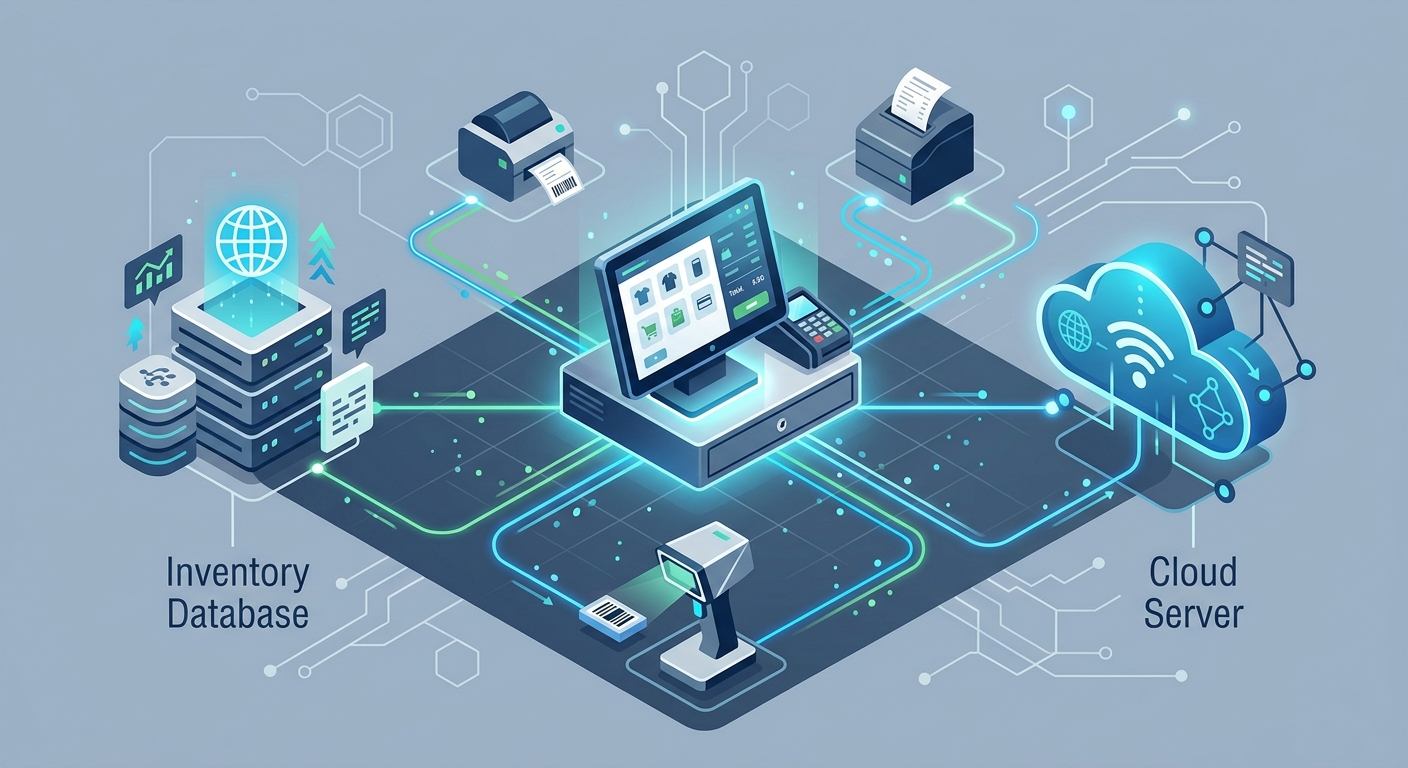
Building custom retail billing software using Node.js allows engineering teams to construct an asynchronous, event-driven backend capable of processing concurrent transactions, coordinating physical peripherals, and managing real-time inventory deductions with sub-millisecond response times.
This technical guide covers the end-to-end architecture and implementation steps required to build a fault-tolerant retail billing engine with Node.js, TypeScript, and modern relational databases.
Why Build Custom Retail Billing Software on Node.js?
Retail operations require high I/O throughput. A typical checkout involves scanning multiple Universal Product Codes (UPCs), checking dynamic discount rules, locking stock batches, calculating tax brackets (such as GST or regional sales tax), outputting thermal printer buffers, and broadcasting stock deltas to other checkout lanes. Node.js is particularly well-suited for this workload due to several architectural advantages:
- Non-blocking Event Loop: Node.js handles thousands of concurrent I/O requests—such as scanner reads, payment gateway callbacks, and printer commands—without tying up operating system threads.
- Unified JavaScript/TypeScript Ecosystem: Shared data models between the frontend POS interface (Electron, React, or Flutter web) and the backend invoice engine prevent serialization discrepancies.
- Hardware Stream Interfacing: The Node.js API provides native support for raw stream buffers, TCP sockets, and serial ports, making communication with ESC/POS receipt printers, digital weighing scales, and cash drawers straightforward.
For organizations planning custom software development to replace restrictive legacy billing setups, the following seven steps establish a scalable foundation.
Step 1: Define the Retail Billing System Tech Stack
Choosing the right retail billing system tech stack requires balancing execution speed, strict ACID compliance for financial records, and low-latency client-server synchronization. A proven architectural configuration includes:
| Layer | Selected Technology | Architectural Purpose |
|---|---|---|
| Runtime Environment | Node.js (LTS) with TypeScript | Provides type-safe execution, asynchronous runtime, and low memory overhead. |
| API Layer | Express.js or Fastify | Exposes REST endpoints for transactions, reporting, and administrative endpoints. |
| Database | PostgreSQL | Ensures transactional integrity, ACID guarantees, and JSONB support for flexible metadata. |
| In-Memory Cache & Bus | Redis | Handles transient cart sessions, rapid product barcode lookups, and Pub/Sub notifications. |
| Terminal Sync | WebSockets (via ws) |
Maintains bi-directional, full-duplex communication across multi-terminal checkout registers. |
| Local Offline Engine | SQLite / IndexedDB | Provides local persistence when store connectivity drops. |
Step 2: Design an Inventory-First Database Schema
The most frequent failure mode in custom shop billing software development is an inventory race condition. If two cashiers scan the last unit of an SKU simultaneously, an improperly designed database schema will permit negative inventory or cause locked transaction timeouts.
To support high-velocity sales and precise financial auditing, use a normalized relational schema in PostgreSQL that isolates master product data, stock allocations, and immutable ledger entries.
Core Relational Tables
- products: Master product catalog (SKU, barcode, title, base price, tax rate ID).
- inventory_batches: Granular stock units linked to specific purchase prices, expiry dates (crucial for grocery and pharmacy billing), and available quantities.
- invoices: Header record containing invoice number, terminal ID, cashier ID, payment method, tax summary, total discount, and status.
- invoice_items: Line-item details capturing the historical price, tax applied, batch reference, and quantity at the exact millisecond of checkout.
- stock_movements: An immutable audit ledger capturing every increment, decrement, return, or shrinkage event.
Preventing Stock Overselling
Rather than reading stock into application memory, verifying it, and saving it back, execute atomic decrement operations directly within a PostgreSQL transaction. This prevents write skew without requiring long database table locks:
BEGIN;

-- Atomically check and deduct available stock
UPDATE inventory_batches
SET quantity = quantity - $1
WHERE id = $2 AND quantity >= $1;

-- If rows affected == 0, rollback and throw out-of-stock exception
-- Otherwise, record the transaction line
INSERT INTO invoice_items (invoice_id, product_id, batch_id, quantity, unit_price, tax_amount)
VALUES ($3, $4, $2, $1, $5, $6);

COMMIT;
Step 3: Build the Node.js Invoice Generator Backend
A resilient nodejs invoice generator backend must separate transaction validation, calculation, and document rendering into decoupled services. The checkout process must proceed through strict pipeline stages:
- Cart Ingestion & Validation: Validate scanned barcodes, ensure no zero-priced items exist without explicit overrides, and verify cashier permissions.
- Tax & Discount Calculation Engine: Apply tiered volume discounts, customer loyalty promotions, and tax calculations (such as CGST/SGST/IGST splits or local sales taxes) using precise integer arithmetic (cents or paise) to avoid floating-point rounding errors.
- Transaction Finalization: Persist the immutable invoice record and deduct inventory inside an isolated transaction.
- Thermal Print Buffer Generation: Compile raw ESC/POS binary buffers or standard PDF documents for thermal receipt printers.
Structuring the calculations cleanly in your backend service helps prevent compliance failures during fiscal audits and integrates easily with enterprise systems, such as Applizor’s retail and ERP products.
Step 4: Implement Multi-Terminal Cashier Synchronization with WebSockets
Modern retail environments rely on multiple checkout counters operating simultaneously alongside central stockrooms. If Terminal 1 completes a sale of an item with only one unit remaining, Terminal 2 must reflect that stock status immediately to prevent checkout errors.
By integrating a WebSocket layer on top of Node.js and Redis Pub/Sub, your application can broadcast stock level changes, customer display updates, and manager approval requests across the local network instantly.
Synchronization Flow
- Each terminal establishes a authenticated WebSocket connection to the Node.js server on application startup.
- When a transaction completes on Terminal A, the Node.js backend emits a
STOCK_DELTAevent to a Redis channel. - All connected Node.js instances receive the event and broadcast the delta to every open terminal socket.
- The terminal UI updates its local cache in memory without requiring full product catalog re-fetches.
Step 5: Architectural Handling of Offline-First Local Database Caching
Retail stores cannot stop processing payments when internet service providers experience outages. Designing for offline resiliency requires an offline-first architecture.
When learning how to build custom retail billing software with nodejs, engineers must decide between a pure cloud model and an edge-hybrid model. For enterprise retail, the edge-hybrid model is essential:
- Local Embedded Cache: Maintain a local database (such as SQLite on an in-store edge server or IndexedDB in an Electron/browser wrapper) populated with active product barcodes, price rules, and offline receipt sequences.
- Sequential Invoice Numbering: Offline terminals issue provisional invoice identifiers with distinct terminal prefixes (e.g.,
REG01-OFF-10492) to eliminate collisions with online systems. - Idempotent Sync Mechanism: When connectivity returns, the local terminal pushes queued transactions to a dedicated Node.js synchronization endpoint (
/api/v1/sync/invoices). The backend processes transactions idempotently, ensuring that duplicate network retries do not double-deduct inventory or create duplicate invoices.
Step 6: Integrate POS Hardware Peripherals
A software-only billing system is incomplete without low-level peripheral integration. Your billing software must communicate reliably with hardware components:
- Barcode Scanners: Most USB/Bluetooth scanners operate in Human Interface Device (HID) keyboard emulation mode, streaming characters terminated by an
Enterkey event. Your frontend must capture these streams without dropping characters during active UI rendering. - ESC/POS Thermal Printers: Communication with network or USB receipt printers relies on ESC/POS binary command standards. Node.js can compose raw binary buffers containing formatting commands (line feeds, bold text, cut commands, and QR code graphics) and transmit them directly over TCP sockets or USB vendor endpoints.
- Cash Drawers: Cash drawers are typically triggered via a kick-pulse wire connected to the receipt printer’s RJ11/RJ12 port. A specific 5-byte sequence sent to the printer opens the drawer automatically when a cash sale is recorded.
For complex architectural deployments requiring specialized hardware driver integration, review our technology stack for modern distributed retail applications.
Step 7: Testing, Compliance, and Production Deployment
Before deploying to live storefront counters, retail billing engines must undergo thorough operational testing:
- Concurrency Load Testing: Simulate multiple terminals posting checkout payloads simultaneously against a localized testing environment using tools like k6 to uncover database deadlocks.
- Tax and Ledger Verification: Run thousands of synthetic carts with odd cent values, multi-tier percentage discounts, and zero-tax exemptions to confirm balancing debit and credit entries.
- Network Degradation Simulation: Artificially induce network latency, packet loss, and abrupt disconnections during active checkout calls to verify that the offline queue and rollback mechanisms function as intended.
- Containerization and Edge Deployment: Package the Node.js application inside lightweight Docker containers managed by a local orchestrator or process manager (such as PM2) to ensure automatic restarts following power failures.
Frequently Asked Questions
Can Node.js handle thousands of rapid barcode scans without slowing down?
Yes. Because barcode scanning involves small I/O payloads, Node.js processes incoming scan lookups in milliseconds when paired with an in-memory Redis cache or indexed PostgreSQL table. Application bottlenecks typically originate in the database layer rather than the Node.js runtime itself.
How do we handle sequential GST/VAT invoice numbers during offline sales?
Assign each physical terminal a unique serial namespace (e.g., T1-2026-0001). When operating offline, the terminal generates invoices within its assigned range. Upon synchronizing with the central Node.js server, these transactions are reconciled into the centralized audit ledger while maintaining their legal tax validity.
What is the best way to print receipts directly from a web or desktop POS client?
For Electron or desktop clients, Node.js can send binary buffers directly to printer ports over USB or TCP. For browser-based clients, running a lightweight local Node.js microservice listening on localhost:9100 allows the web client to POST print jobs that the local service outputs directly to connected hardware, bypassing native browser print dialogs.