
Standard support chatbots frequently fail when handling multi-tier troubleshooting or nuanced product questions. Rule-based bots break whenever a customer phrasing deviates from a predefined script, while generic large language models (LLMs) hallucinate plausible-sounding configurations or reference deprecated product features. An ai knowledge base rag (Retrieval-Augmented Generation) pipeline bridges this gap by grounding language model responses directly in your company’s authoritative documentation, API references, and resolved tickets.
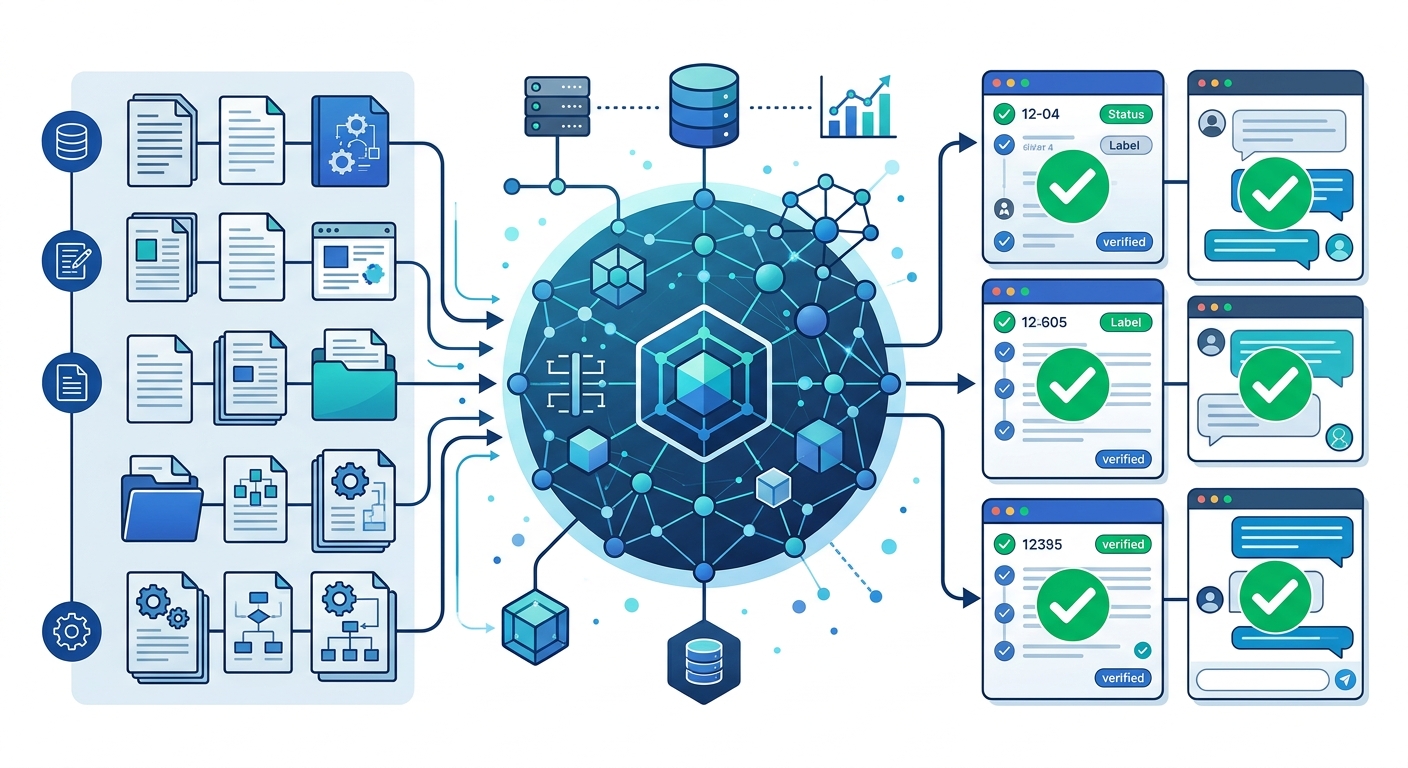
By combining vector retrieval with controlled generation, engineering and customer success teams can deliver instant, verifiable answers while preserving human-in-the-loop escalation paths. Here is a technical, end-to-end breakdown of how to build an AI knowledge base with RAG for customer support.
Understanding the AI Knowledge Base RAG Architecture
A production-ready RAG system separates knowledge storage from natural language reasoning. Instead of retraining or fine-tuning models every time a software patch ships or a refund policy updates, RAG indexes knowledge externally and injects only the most relevant context into the model’s runtime prompt.
In a customer support environment, an ai knowledge base rag architecture relies on three core layers:
- The Ingestion and Vector Layer: Parsing structured articles, troubleshooting guides, release notes, and PDFs; slicing them into semantically meaningful chunks; generating numerical vector embeddings; and indexing them in a vector database alongside granular metadata.
- The Retrieval and Re-Ranking Layer: Translating incoming customer tickets or chat queries into query vectors, executing dense and sparse hybrid searches, and passing candidate snippets through a re-ranking model to filter out irrelevant text.
- The Generation and Guardrail Layer: Assembling a structured prompt that contains strict system instructions, conversation history, and the retrieved context chunks, then directing the LLM to formulate a grounded response with source citations.
If you are exploring turnkey enterprise options or custom implementations, reviewing purpose-built solutions like Applizor AI Knowledge Base can help your team assess build-versus-buy trade-offs early in your planning cycle.
7 Steps to Build an AI Knowledge Base with RAG for Customer Support
Step 1: Audit and Consolidate Knowledge Repositories
A RAG pipeline is only as reliable as the raw data feeding it. Ingestion must begin with a structured audit of your existing knowledge footprint across documentation hubs (Notion, Confluence, GitBook), help desk articles (Zendesk Help Center, Intercom Articles), and resolved ticket logs.
Isolate verified resolution paths from speculative internal chatter. Ingesting raw, unvetted Slack threads or unedited ticket histories introduces conflicting guidance into your vector index. Establish an initial whitelist of verified source documents, and assign version tags to every document so deprecated product workflows can be programmatically excluded during retrieval.
Step 2: Optimize Document Chunking for Support Documents
Chunking strategy directly dictates whether your retriever pulls actionable instructions or fragmented noise. Naive character-count splitting often cuts critical code blocks, prerequisite lists, or nested troubleshooting steps in half.
- Recursive Markdown/Header Splitting: Break content by logical document structure (
# H1,## H2,### H3). This keeps sub-procedures and their contextual prerequisites within the same retrieval unit. - Chunk Sizing: For support documentation, optimal chunk sizes typically range between 400 and 800 tokens, accompanied by a 10% to 15% sliding window overlap to maintain context across boundaries.
- Parent-Child Indexing: Store small chunks (100–150 tokens) for granular vector search matches, but link them to a parent document chunk (600–1000 tokens) that gets passed to the LLM context window. This gives the retriever high semantic precision while providing the generator complete procedural context.
- Metadata Tagging: Append structural metadata to every chunk: product line, operating system version, user role permission, article last-updated timestamp, and source URL. This metadata enables deterministic pre-filtering at query time.
Step 3: Select Embedding Models and Vector Databases
Your embedding model determines how well semantic similarity captures customer intent, while the vector database controls query throughput, indexing latency, and metadata filtering performance.
| Vector Database | Deployment Model | Primary Strengths | Best Use Case |
|---|---|---|---|
| Pinecone | Managed Cloud (SaaS) | Zero-ops scaling, fast metadata filtering, hybrid search support | Rapid deployment for high-traffic SaaS support desks |
| Qdrant | Open Source / Cloud | Payload-based filtering, Rust performance, native hybrid search | Custom enterprise infrastructure with self-hosting mandates |
| pgvector (PostgreSQL) | Self-Hosted / Managed Cloud | Reuses existing relational DB infrastructure, ACID compliance | SMEs wanting minimal stack complexity alongside CRM data |
For vector embeddings, modern models such as OpenAI’s text-embedding-3-small (or large) and open-weight models like bge-large-en-v1.5 offer high retrieval benchmark scores. Ensure your chosen embedding dimensionality matches your vector database schema index constraints.
Step 4: Implement Hybrid Search and Re-Ranking
Relying solely on dense vector search (cosine similarity) often fails when customer queries contain exact alphanumeric strings, error codes (e.g., ERR_CONNECTION_TIMED_OUT), or SKU numbers. Dense embeddings understand conceptual meaning but struggle with exact token matches.
To build a robust rag knowledge base customer support pipeline, implement hybrid search:
- Run dense semantic vector search alongside sparse keyword search (such as BM25).
- Combine results using Reciprocal Rank Fusion (RRF).
- Pass the top 15–20 candidates through a cross-encoder re-ranking model (such as Cohere Rerank or BGE-Reranker). The re-ranker evaluates the semantic relationship between the query and candidate snippets holistically, discarding false positives before prompt assembly.
Step 5: How to Build a RAG Chatbot for Support in Python
When you build a RAG chatbot for support in Python, orchestrate the retrieval, prompt templating, and model generation cleanly. You can use standard orchestration libraries or lightweight custom scripts. The following conceptual pattern illustrates the core pipeline logic using LangChain and a vector store interface:
from langchain_community.vectorstores import Pinecone
from langchain_openai import OpenAIEmbeddings, ChatOpenAI
from langchain_core.prompts import ChatPromptTemplate
from langchain_core.runnables import RunnablePassthrough
from langchain_core.output_parsers import StrOutputParser

# 1. Initialize embeddings and retriever with metadata filters
embeddings = OpenAIEmbeddings(model="text-embedding-3-small")
vectorstore = Pinecone.from_existing_index(
    index_name="support-knowledgebase",
    embedding=embeddings
)
retriever = vectorstore.as_retriever(
    search_type="similarity",
    search_kwargs={"k": 4, "filter": {"status": "verified"}}
)

# 2. Formulate system prompt with strict grounding constraints
system_template = """You are a technical support assistant.
Answer the customer's question using ONLY the provided context snippets.
If the context does not contain the answer, reply that you do not have
enough information and suggest escalating to a human agent.
Do not speculate or extrapolate beyond the context.

Context:
{context}

Question:
{question}
"""

prompt = ChatPromptTemplate.from_template(system_template)
llm = ChatOpenAI(model="gpt-4o-mini", temperature=0.0)

# 3. Assemble LCEL retrieval-generation chain
rag_chain = (
    {"context": retriever, "question": RunnablePassthrough()}
    | prompt
    | llm
    | StrOutputParser()
)
For complex business environments, engineering teams frequently tie these generation chains into broader AI automation software development services to orchestrate end-to-end multi-agent systems.
Step 6: Connect with Helpdesk Workflows and Ticketing Systems
An isolated chatbot interface provides limited operational value. Your RAG knowledge base must hook directly into your customer support channels—such as Zendesk, Freshdesk, Intercom, or internal Slack channels.
Use webhook-driven architectures or workflow engines like n8n to manage incoming events. The workflow pattern proceeds as follows:
- Ticket Ingestion: A new ticket triggers a webhook payload containing the customer query, customer tier, and device environment.
- Knowledge Retrieval & Internal Draft: The RAG service queries the vector database using extracted metadata filters and composes a proposed response.
- Agent Assist vs. Direct Resolution: For low-risk, informational queries, the system can post a direct reply with source documentation links. For high-touch or complex technical problems, the engine posts the drafted response as an internal private note for human agents to review and approve with one click.
- Automated Escalation: If the model’s confidence score falls below a predefined threshold, or if the retrieved chunks do not contain a match, the workflow automatically routes the ticket to the appropriate tier-2 human queue without presenting ungrounded guesses to the user.
Step 7: Continuous Ingestion, Evaluation, and Guardrails
Knowledge bases degrade over time if updates are not synced automatically. Deploy a continuous ingestion worker that listens to changes in your documentation repository (via Git commits or CMS update webhooks). When an article is updated, the worker deletes outdated chunks from the vector database by document ID and inserts newly embedded chunks instantly.
Simultaneously, monitor pipeline performance using automated evaluation frameworks (such as RAGAS or TruLens) tracking three metrics:
- Faithfulness: Does every factual claim in the response map directly back to a retrieved context chunk?
- Answer Relevance: Does the output directly resolve the customer’s stated question without conversational fluff?
- Context Precision: Are the top retrieved chunks actually relevant to the problem statement?
For organisations scaling their operational toolsets, combining intelligent knowledge bases with broader AI automation solutions for small business ensures support automation integrates tightly with CRM and inventory databases.
Cost and Performance Trade-offs for Support Teams
Designing an enterprise RAG pipeline requires balancing accuracy, latency, and operational expense across embedding models and generation LLMs.
| Component Selection | Typical Latency Impact | Cost Consideration | Operational Trade-Off |
|---|---|---|---|
| Small Proprietary LLMs (e.g., GPT-4o-mini, Claude 3.5 Haiku) | Low (200–500ms time-to-first-token) | Very Low per-token API pricing | Excellent for high-volume tier-1 support queries; requires prompt tuning for complex edge cases. |
| Flagship LLMs (e.g., GPT-4o, Claude 3.5 Sonnet) | Medium (600–1200ms) | Moderate to High | Higher reasoning capability for multi-step software debugging; higher cost per ticket if used across all tiers. |
| Dedicated Self-Hosted Embeddings (e.g., TEI on AWS) | Extremely Low (<50ms) | Fixed infrastructure cost (GPU instances) | Reduces API dependency and guarantees data privacy; requires dedicated DevOps maintenance. |
| Managed SaaS Vector Stores (e.g., Pinecone Serverless) | Low (10–30ms retrieval) | Pay-per-query + storage | Zero maintenance overhead; cost scales directly with query spikes. Documentation available at Pinecone Docs. |
A cost-effective pattern is multi-tiered routing: use smaller, fast models for direct FAQ and article retrieval, while delegating complex tickets involving logs or code debugging to flagship models with re-ranking.
Frequently Asked Questions
How does an AI knowledge base RAG prevent hallucinations in customer support?
RAG minimizes hallucinations by restricting the language model’s generation scope. The system prompt instructs the LLM to rely strictly on the retrieved context snippets and to acknowledge when documentation is missing. Adding deterministic guardrails and re-rankers ensures the model never attempts to improvise instructions.
What is the difference between fine-tuning and RAG for customer support?
Fine-tuning updates the internal weights of a model to learn a specific tone, format, or niche task, but it does not reliably teach new, frequently changing facts. RAG retrieves fresh, authoritative data at runtime without retraining. For customer support, where product features and policies change frequently, RAG is faster to update, cheaper to maintain, and traceable to specific source articles.
How do I handle customer support queries that require user-specific account data?
A standard RAG pipeline handles static knowledge (docs, policies, guides). To incorporate customer-specific information (order status, license keys, active subscriptions), adopt an “Agentic RAG” architecture. In this design, the model uses function calling or API tools to fetch the user’s account state from your CRM or billing database and combines that state with knowledge base context before generating an answer.